Meta Description: Zapier vs Make.com vs n8n compared for small business in 2026. Real pricing, hidden costs, and which tool Connecticut businesses use to automate without overpaying.

You signed up for Zapier because it was easy. Six months later, you're paying $599/month and your automations still break every time an app updates. Sound familiar?
Here's what nobody tells you when you start with Zapier: the pricing model is designed to grow with your usage — and that sounds good until you realize it's really designed to grow your invoice every month whether you want it to or not. Watch short video here
I'm Renzo, founder of RDC Group. Over the past three years, I've built automation systems for Connecticut businesses across HVAC, e-commerce, legal, and marketing — using all three of these platforms. I've migrated clients off Zapier onto n8n and saved them $400-600/month. I've also steered clients away from n8n because it was the wrong fit.
This guide is not sponsored by any of these platforms. I'm going to tell you exactly what each one costs, what it's actually good for, and which one you should use based on your situation.
Here's a scenario I see constantly with Connecticut small businesses.
A marketing agency signs up for Zapier. They start with simple stuff: new lead in HubSpot → send Slack notification. Easy. $49/month. No problem.
Then they add more workflows. Lead comes in → update CRM → send welcome email → notify sales rep → create task in Asana. That's 5 tasks per lead. 500 leads per month = 2,500 tasks. Now they're on the Professional plan at $299/month.
Then a client needs Facebook Ads data pulled daily, reports generated, and emailed automatically. Add another 3,000 tasks. Now they're at $599/month.
Then they want to automate onboarding, contract generation, invoice follow-up. $799/month.
In 12 months, they went from $49 to $799 — and the automations aren't even that complex. That's $9,588/year for something you could run on n8n for $240.
That's not a hypothetical. That's a real client I inherited last year.
Before I break down pricing, you need to understand what you're actually buying with each platform.
Zapier is a no-code automation platform. You connect apps with "Zaps." A Zap has a trigger (something happens) and one or more actions (do something else). They have 7,000+ app integrations — more than anyone else. The interface is so simple that a non-technical business owner can build automations without any help. That's the pitch, and honestly, it's true.
Make.com (formerly Integromat) is a visual workflow builder. Instead of simple trigger → action chains, Make lets you build complex scenarios with parallel paths, data routers, filters, iterators, and nested logic. The interface looks like a flowchart — you can literally see how data moves through your automation. It has around 1,500 app integrations, fewer than Zapier, but it handles complex data manipulation that would require 10 separate Zaps to replicate.
n8n is an open-source workflow automation tool. You can self-host it on your own server, or use their cloud. It has 400+ integrations, but since it's code-adjacent, you can also use the built-in code node to write JavaScript for anything that doesn't have a native integration. The n8n 2.0 update shipped native AI agent nodes with LangChain integration — meaning you can build AI-powered automations without a single line of code in many cases. This is where the platform pulled significantly ahead for AI-heavy workflows in 2026.
Let's talk actual numbers, because the pricing pages are intentionally confusing.
Zapier Pricing (2026)
Zapier charges per "task." A task is one action step completed in a Zap. A simple 2-step Zap (trigger + one action) uses 1 task per run. A 5-step Zap uses 4 tasks per run (every action step after the trigger).
Free: 100 tasks/month. Good for testing, useless for real business.
Starter: $29.99/month — 750 tasks. If you have 500 leads/month and a 3-step Zap, that's 1,000 tasks. You're already over.
Professional: $73.50/month — 2,000 tasks.
Team: $103.50/month — 2,000 tasks with multi-user.
Scale up to 50,000 tasks: $599/month.
The trap: every time you add a step to an automation, your task count goes up. More complex automations = faster burn through your monthly limit = higher plan required.
Make.com Pricing (2026)
Make charges per "operation." An operation is roughly equivalent to a Zapier task — each module execution counts as one operation.
Free: 1,000 operations/month.
Core: $10.59/month — 10,000 operations. Yes, that's 13× more operations for $10 less than Zapier's starter.
Pro: $18.82/month — 10,000 operations with advanced features (custom variables, full execution history, priority support).
Teams: $34.12/month — 10,000 operations, 3 users.
Business: $55.24/month — unlimited operations (fair use).
The key insight: Make.com's operations count is much more forgiving than Zapier's tasks at the same price point. A 10-step scenario in Make costs 10 operations. In Zapier, that same automation costs 9 tasks — similar, but at 5× the price per unit.
n8n Pricing (2026)
n8n charges per "execution" — meaning the entire workflow run counts as one execution regardless of how many steps it has.
Self-hosted: You download the software and run it on your own server. Cost = server cost only. A DigitalOcean droplet capable of handling enterprise-level workflows costs $20-40/month. That's it. Unlimited workflows, unlimited executions.
n8n Cloud Starter: $24/month — 2,500 executions/month.
n8n Cloud Pro: $50/month — 10,000 executions/month.
n8n Cloud Enterprise: Custom pricing.
Here's the math that makes your eyes water: at 50,000 workflow executions per month, Zapier charges $599/month. n8n self-hosted on a $40/month server handles the same volume for $40/month. Over 12 months, that's $7,188 vs $480. Same automations. Completely different bill.
Ease of use: Zapier wins by a mile. You can build your first automation in 10 minutes with zero experience. Make has a steeper learning curve — the visual interface looks impressive but requires you to understand data mapping and module types. n8n is the most complex, but n8n 2.0 has significantly improved the UI, and the AI assistant can now build workflows from natural language descriptions.
App integrations: Zapier wins with 7,000+. Make has 1,500+. n8n has 400+ native, but the code node means you can connect to any API that exists, which theoretically covers everything.
Complex logic: n8n wins. It handles conditional branching, loops, parallel execution, error handling, and sub-workflows in ways that would be cumbersome in Make and nearly impossible in Zapier without premium workarounds.
AI automation: n8n wins in 2026 after the 2.0 update. The native AI Agent node with LangChain and 70+ AI nodes means you can build agents that think, decide, and act — not just move data between apps. Make.com has Maia, their AI assistant that builds scenarios from natural language, which helps with setup. Zapier has basic AI steps but nothing close to n8n's agent capabilities.
Data privacy: n8n wins for self-hosted. Your data never leaves your servers. This matters for law firms, healthcare, accounting, and any business handling sensitive client data. Zapier and Make.com data passes through their cloud infrastructure.
Support: Zapier has the best customer support by far — phone, chat, detailed documentation. Make has solid documentation and community. n8n's support is strongest for paid cloud plans; self-hosted users rely on community forums, though these are active and helpful.
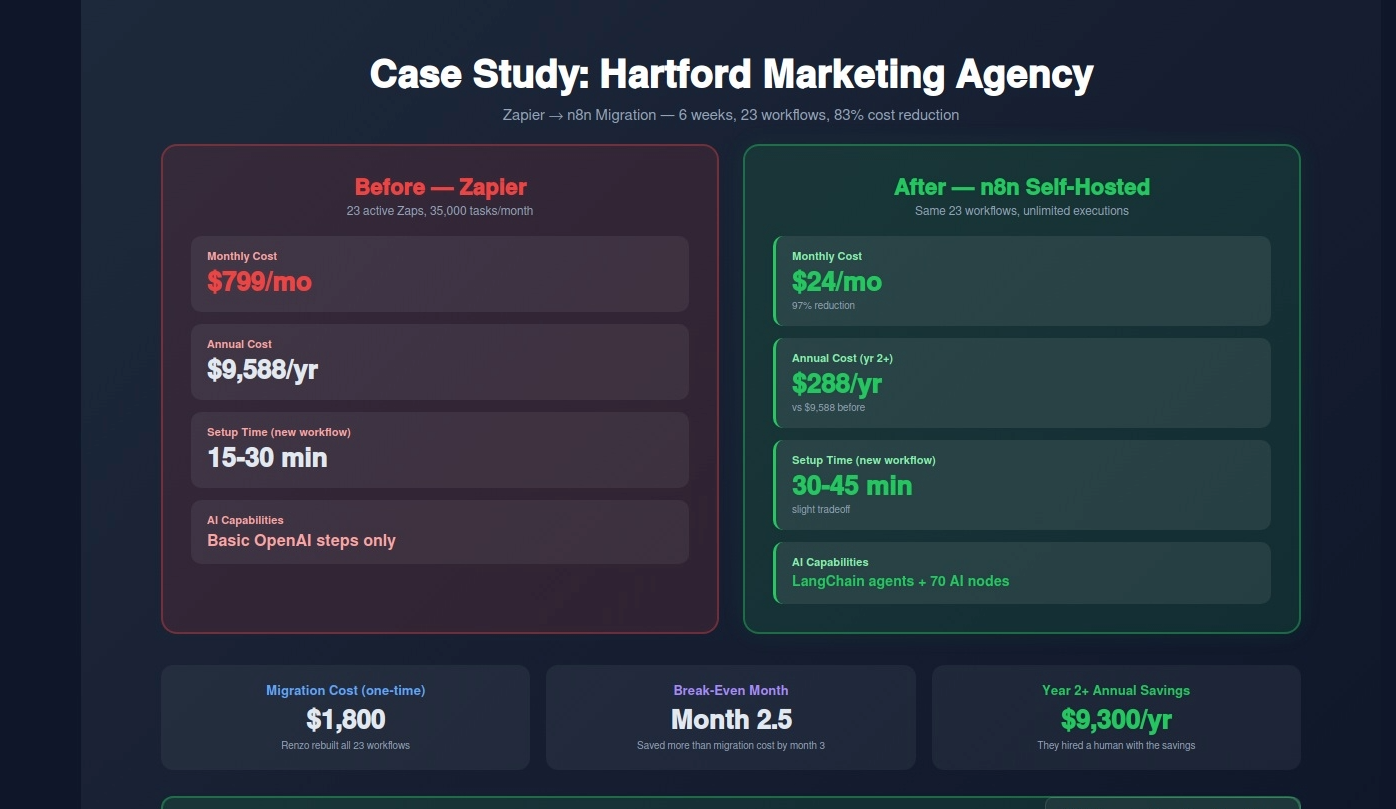
A digital marketing agency in Hartford came to me in October 2025 with a specific problem: their Zapier bill had hit $799/month and they were about to need to upgrade again as they added a new client.
Their setup included 23 active Zaps handling lead intake, CRM updates, client reporting, social media scheduling, invoice follow-up, and team notifications. They were running approximately 35,000 tasks per month.
Before (Zapier): Monthly cost: $799 Setup time for new automation: 15-30 minutes Multi-step workflows: Limited by task counting AI capabilities: Basic OpenAI steps only Annual spend: $9,588
I audited their workflows and found that 18 of their 23 automations were straightforward data-movement workflows that required no advanced features — exactly what n8n handles cleanly. The remaining 5 were more complex, but n8n's code node could handle them.
We migrated over 6 weeks, spinning up an n8n instance on a $24/month DigitalOcean droplet. Total migration cost: $1,800 one-time (my fee for rebuilding the workflows and testing).
After (n8n self-hosted): Monthly cost: $24 Setup time for new automation: 30-45 minutes (slightly longer due to learning curve) Multi-step workflows: Unlimited, no cost penalty AI capabilities: Full LangChain integration with AI agent nodes Annual spend: $288 + $1,800 migration = $2,088 first year, $288 from year 2 onward
Year 1 savings: $7,500. Year 2+ savings: $9,300/year.
The agency owner told me the payback period on the migration was 2.5 months. From month 3 onward, it was pure savings. They used that freed-up budget to invest in a dedicated account manager — a human role that actually grew revenue.
❌ Mistake 1: Defaulting to Zapier Because It's Familiar
Zapier is the brand everyone knows, so people start there and never consider alternatives. That's fine if your volume stays low. But if you're running more than 5,000 tasks per month, you're overpaying. The brand recognition premium costs real money at scale.
❌ Mistake 2: Underestimating n8n's Learning Curve for Non-Technical Teams
I've recommended n8n to business owners who then spent 3 frustrated weeks trying to self-host and set up their first workflow. n8n is powerful, but if nobody on your team has any technical background — meaning they've never used a terminal, never configured a server, never worked with JSON — the self-hosted route will be a painful experience. Use n8n Cloud instead, or hire someone to set it up for you.
❌ Mistake 3: Using Make.com for Simple One-Step Automations
Make.com is overkill for "when I get a new email, add a row to Google Sheets." The visual builder adds complexity that simple automations don't need. If your workflows are all simple trigger-action pairs, Zapier's ease of use actually wins even at higher cost — the time savings on setup and maintenance have real value.
❌ Mistake 4: Not Accounting for Team Access in Pricing
Zapier's Starter plan is single-user. If your team needs access, you're jumping to Team at $103.50/month minimum. Make.com's Core plan also limits users. n8n self-hosted has no user limits — everyone on your team can access it for the same $20-40 server cost.
❌ Mistake 5: Migrating Everything at Once
If you decide to move from Zapier to n8n, don't migrate all 30 automations in one weekend. Migrate 2-3 workflows, run them in parallel with the originals for 2 weeks, confirm everything works, then cut over. Rushing a migration leads to broken workflows that nobody notices for weeks because the original Zap was quietly running the whole time.
❌ Mistake 6: Ignoring the Cost of Your Own Time
Here's the honest counter-argument to everything I've said above: if you spend 40 hours migrating from Zapier to n8n and your time is worth $150/hour, you've spent $6,000 in time to save $7,000/year. The math still works, but barely in year 1. Factor your time cost before deciding to DIY a migration.
Use Zapier if: you're a solo operator or small team, you need automations running in days not weeks, you have fewer than 5,000 tasks per month, and you have zero technical staff. The ease of use premium is worth it.
Use Make.com if: you're a mid-size service business (HVAC, dental, law firm, agency) running 5,000-50,000 operations per month, you need visual workflows with complex conditional logic, and you want better pricing than Zapier without the complexity of self-hosting n8n.
Use n8n if: you're running high-volume workflows (50,000+ executions/month), you have someone even slightly technical on your team, you're building AI-powered automation agents, you handle sensitive client data that shouldn't leave your servers, or you want the absolute lowest long-term automation cost.
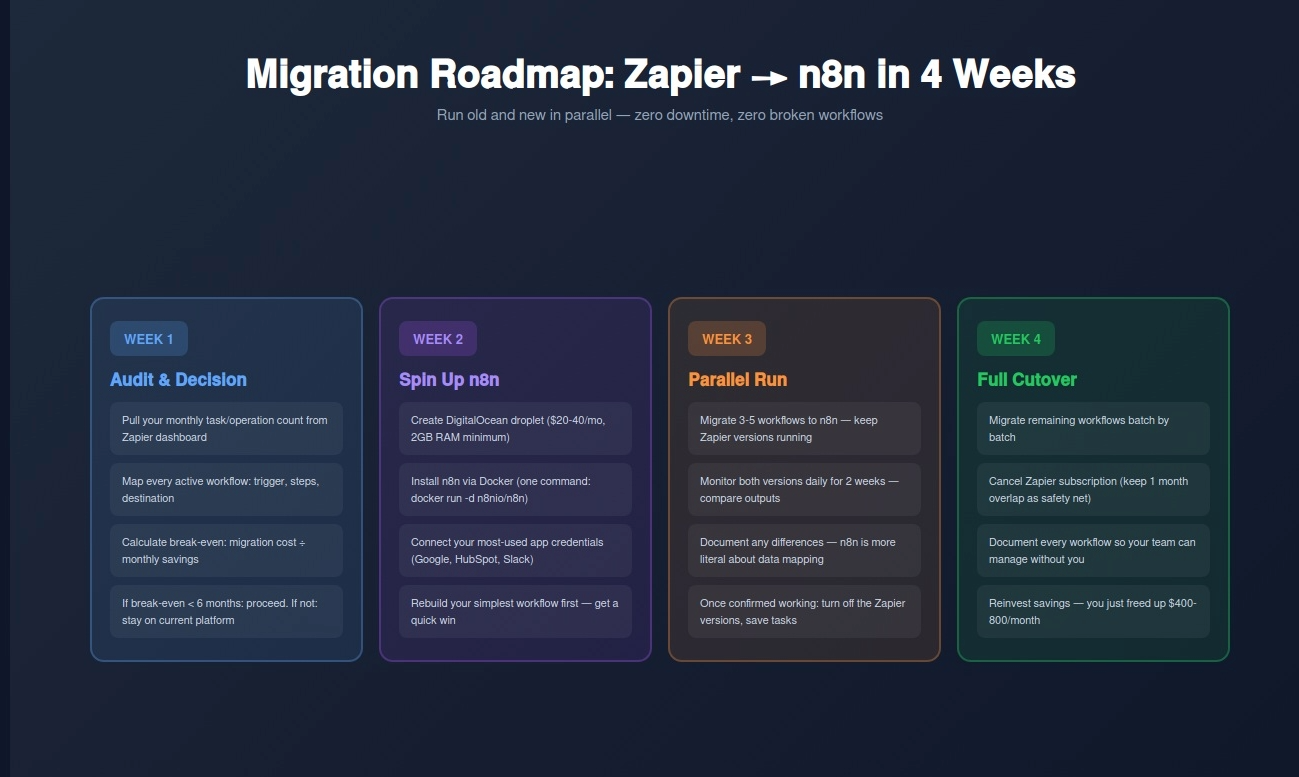
Week 1: Audit Your Current Setup
Log into Zapier or Make.com and pull your usage data. How many tasks or operations are you running per month? How many active workflows do you have? Map each workflow: trigger source, steps, destination. This audit takes 2-3 hours but tells you exactly whether switching makes financial sense. If you're under 2,000 tasks/month on Zapier, stay there — the savings don't justify the switching cost yet.
Week 2: Test the Alternative
Sign up for a free trial of whichever platform you're considering. Take your simplest workflow — the one you run most often — and rebuild it on the new platform. Time yourself. See how it feels. Most people underestimate how long the learning curve takes when just reading about it, and overestimate it once they're actually building.
Week 3: Cost Projection
Take your current monthly task/operation count. Apply the pricing structure of your target platform. Factor in your time cost for migration (be honest — add 50% buffer). Calculate break-even month. If break-even is within 6 months and you plan to use the tool for 2+ years, the switch makes financial sense.
Week 4: Migration
Start with 3 workflows. Build them on the new platform, test them thoroughly, and run both the old and new versions in parallel for 2 weeks. Once confirmed working, turn off the old ones. Repeat until fully migrated.
If you want RDC Group to handle the audit, migration planning, and build — here's what that looks like:
Automation Audit (One-Time): $800 We review your current automation setup, map every workflow, identify inefficiencies, and give you a written recommendation with projected cost savings.
Migration Project: $1,500-$3,500 Depends on number of workflows (up to 30 workflows). We rebuild everything on your target platform, test thoroughly, and document every workflow so your team can manage it going forward.
Monthly Maintenance: $300-$500/month We monitor your automation stack, fix broken workflows, and add new ones as your business needs change.
If your Zapier or Make.com bill is over $200/month, there's a very good chance we can cut it by 60-80% while adding more automation capability — not less. The math is that straightforward.
Free Automation Cost Audit
We'll review your current setup and show you:
Contact: Email: renzo@rdcgroup.co Phone: (860) 968-0135 Website: rdcgroup.co Book:
Book Your Free Automation Audit →
No commitment. No sales pitch. Just a free analysis of whether you're overpaying for automation — and by exactly how much.
RELATED: How to Automate 80% of Digital Marketing Work While Maintaining Human Connection
RELATED: Why Connecticut Businesses Are Automating Faster Than the Rest of the Country