In this guide, you'll see exactly why brands are making this switch, which ticket types AI handles and which it doesn't, and what it actually costs to set up.
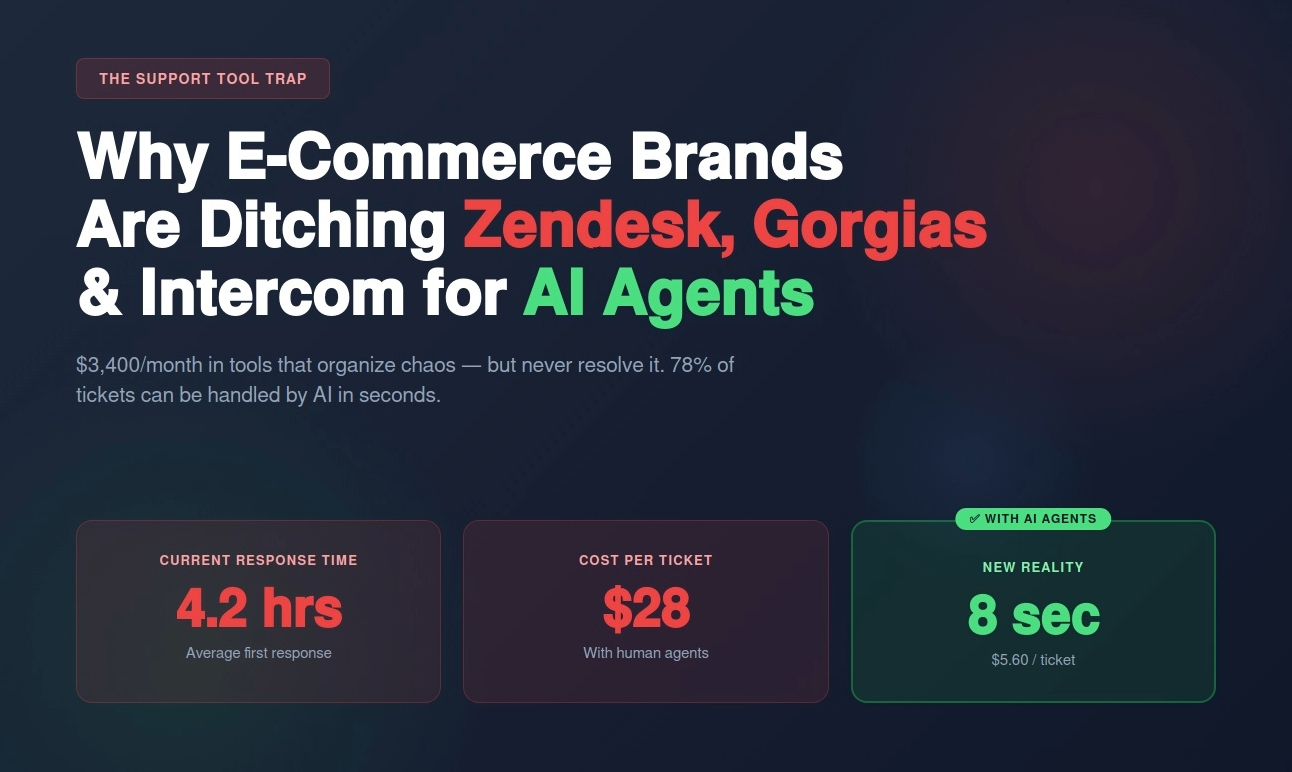
Your support inbox has 847 unresolved tickets.
It's Tuesday morning. Your team of 4 agents started Monday with 612 tickets. By end of day, they cleared 380. But 635 new ones came in overnight.
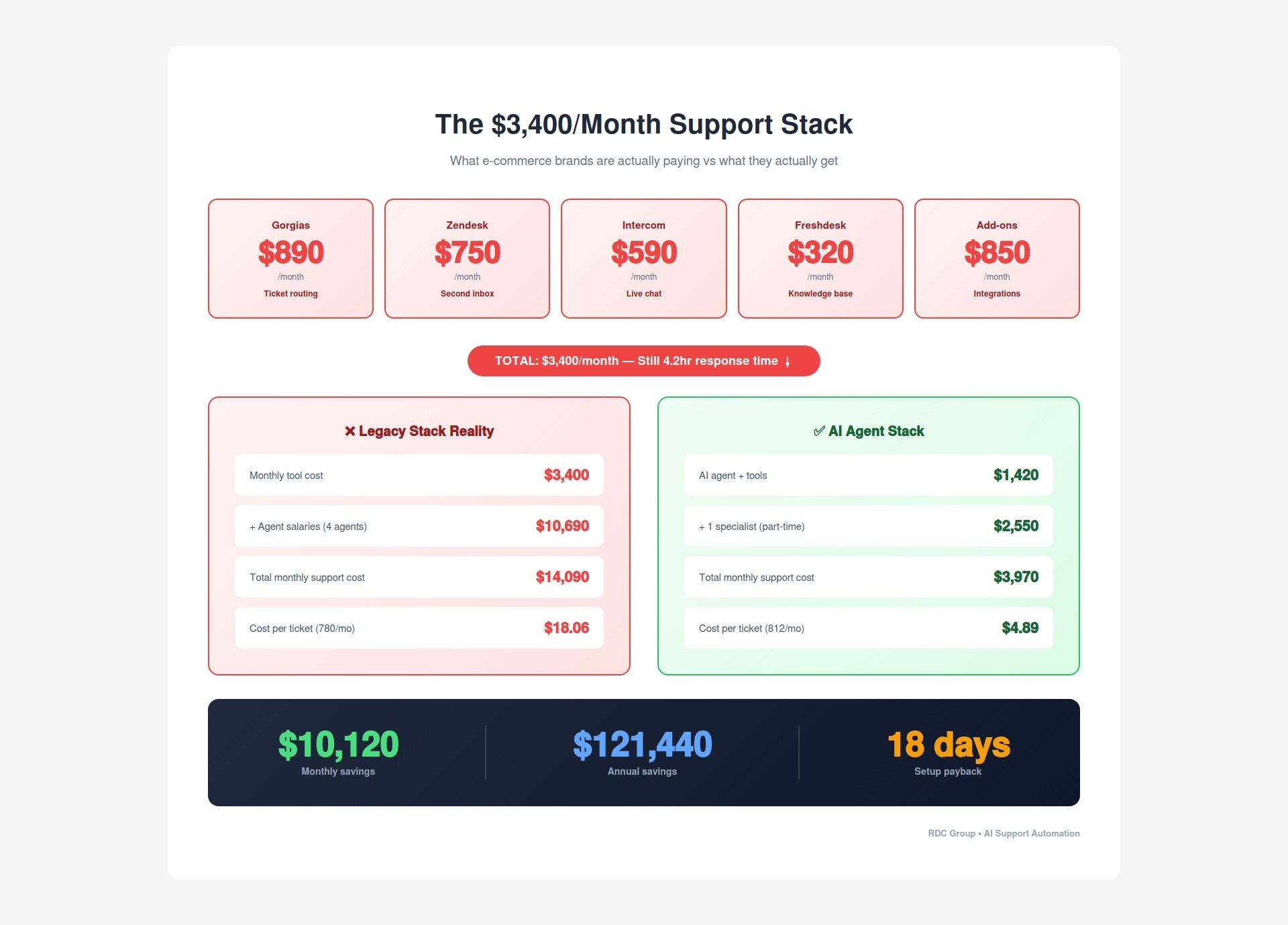
You're drowning. And you're paying $3,400 a month in SaaS subscriptions for the privilege.
Here's what that $3,400 actually buys you:
Total: $3,400/month. And your average response time is still 4.2 hours.
These tools don't solve support. They organize it. There's a massive difference, and most e-commerce brands are paying for the wrong one.
I'm Renzo, founder of RDC Group. We build AI support systems for e-commerce brands. Over the past year, we've helped brands transition off legacy support stacks and onto AI agents, and the shift is stark:
In this guide, you'll see exactly why brands are making this switch, which ticket types AI handles and which it doesn't, and what it actually costs to set up.
Let's be precise about what Zendesk, Gorgias, and Intercom are.
They are ticket management platforms. They make it easier for humans to handle tickets. They do not resolve tickets.
A ticket comes in. The tool does this:
What it does not do: answer the customer's question.
That's still a human's job. And the human can only handle so many tickets per day. So the queue grows. Response times stretch. Customers wait.
Zendesk launched in 2007. Intercom in 2011. Gorgias in 2017. They were all built on the assumption that customer support is human work — that someone has to read every message and write every reply.
That assumption broke in 2023. AI models became good enough to read a customer question, pull the correct answer from a knowledge base, and write a response that sounds like a real person. In seconds, not hours.
The tools didn't evolve fast enough. So brands started building around them — and eventually, replacing them.
Before we get into the AI, let's look at what your support queue is really made of.
Most brands assume their support tickets are complex. They're not.
Typical distribution for a brand doing $2M-$8M in revenue:
That's 96% of tickets that are answerable with information you already have. Order status is in your Shopify dashboard. Return policies are written down. Product specs are in your catalog.
An AI agent doesn't need to think creatively about these. It needs to find the right data and format a clear answer. That is exactly what AI does well.
The remaining 4% — real disputes, ambiguous situations, angry customers who need empathy — those go to a human agent. But here's what changes: instead of 4 agents handling 800 tickets a day, you have 1 specialist handling 32 tickets a day. All the cases that actually require judgment. No repetitive volume. That's not a support team anymore. That's a high-value support specialist role.
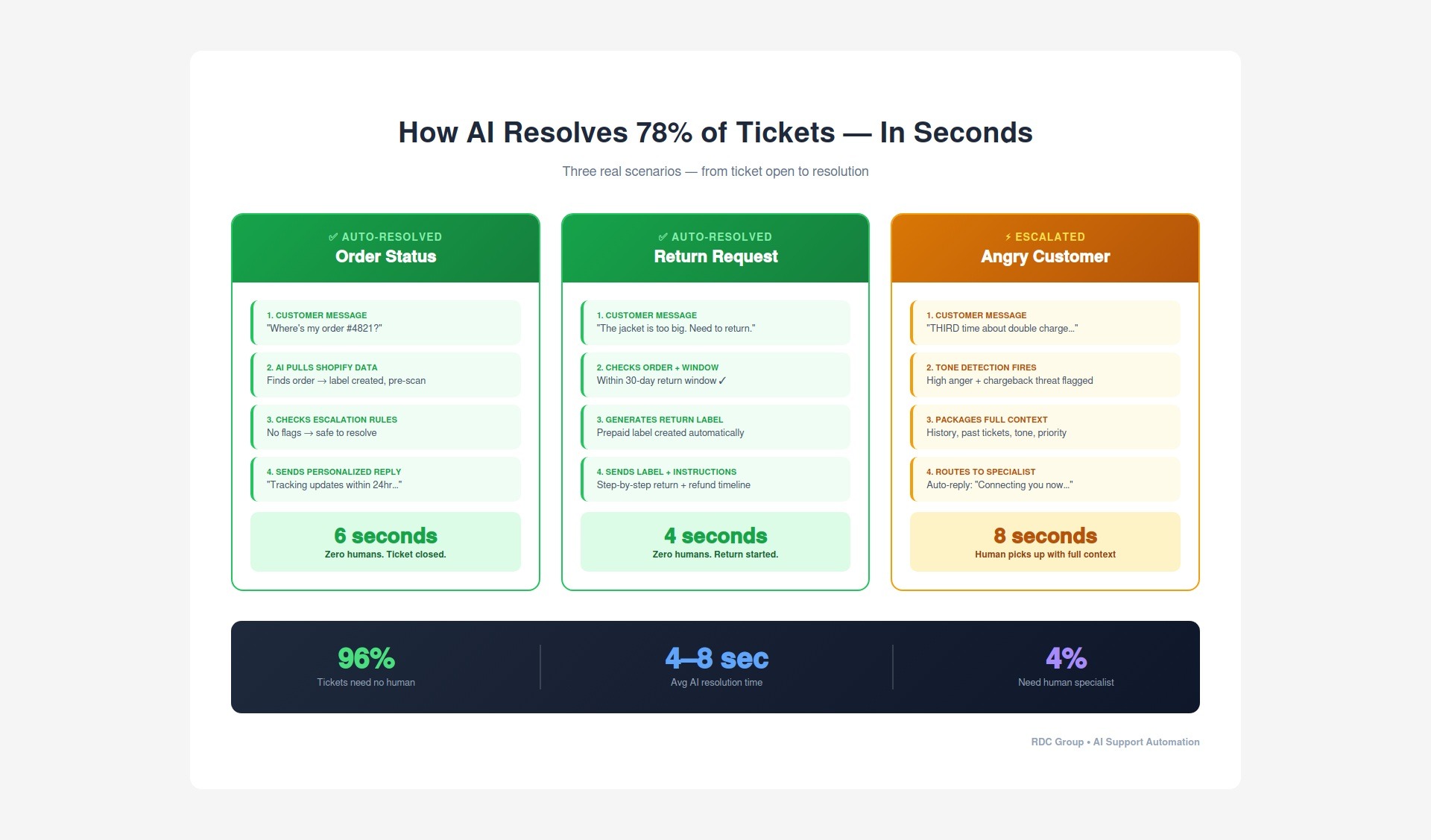
Here's what happens when a ticket hits an AI agent — step by step.
Customer message: "Hey, I placed an order 3 days ago and the tracking number isn't updating. Order 4821. What's going on?"
What the AI does:
The response:
"Hi Sarah — I looked into order #4821. It's been fulfilled on our end and the shipping label was generated this morning. Sometimes there's a 24-hour gap before the carrier scans and updates tracking. You should see movement by tomorrow. If it still hasn't updated by [date], just reply here and we'll escalate directly with the carrier."
Total time: 6 seconds. Zero humans involved. Answer is accurate because it's pulled from real data, not generated from memory.
Customer: "The jacket I ordered is too big. I need to return it."
AI does:
Done. No human needed. The customer has everything they need to complete the return.
Customer: "This is the THIRD time I've reached out about being charged twice. Nobody is helping me. I'm disputing this with my credit card company."
AI does NOT try to answer this. Here's what happens instead:
The human agent picks up with everything they need. The customer doesn't repeat themselves. The issue gets resolved.
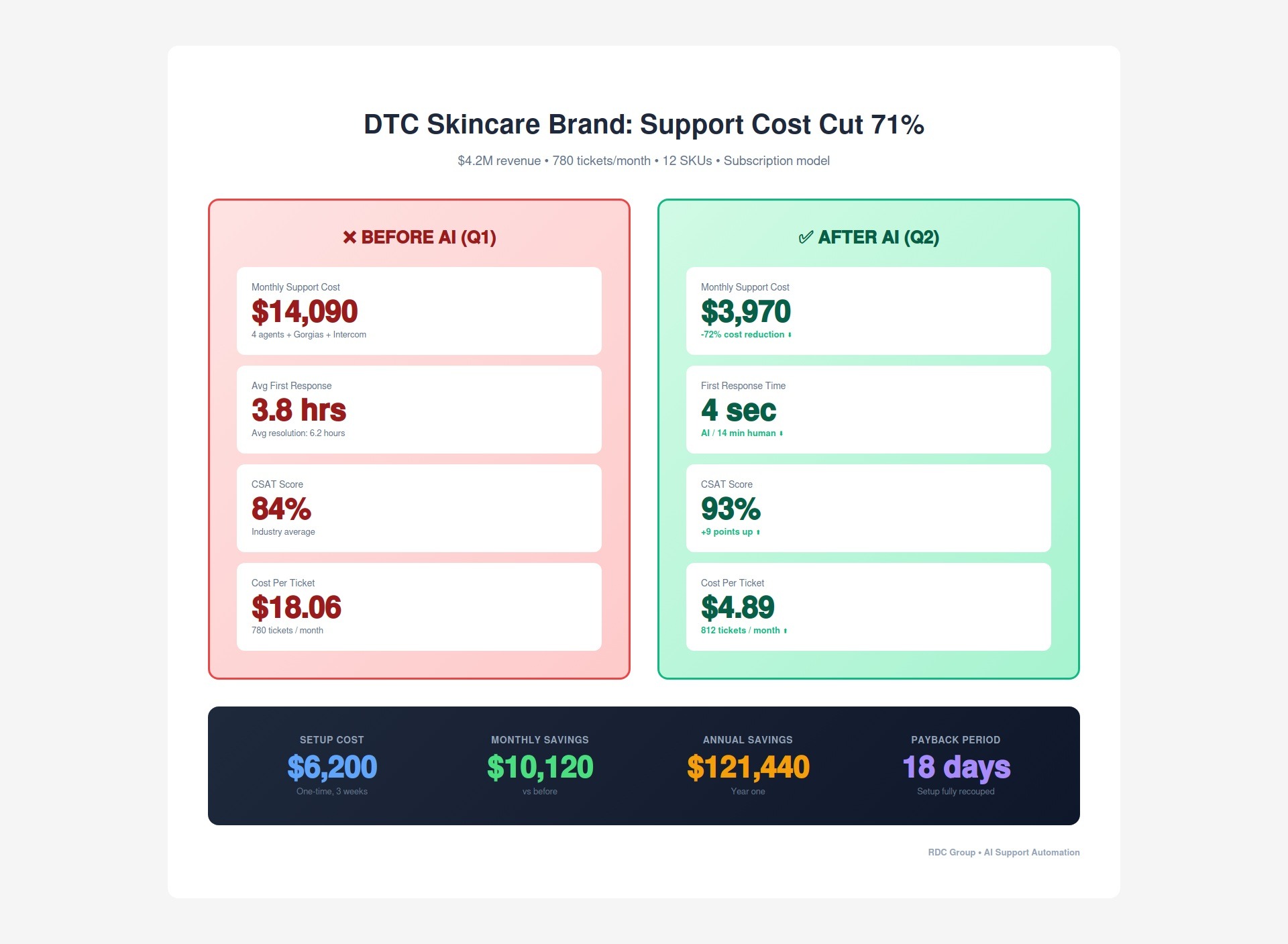
A direct-to-consumer skincare brand doing $4.2M in annual revenue. Twelve SKUs, a subscription model, and a support team of 4 agents handling roughly 780 tickets a month.
The ticket mix looked exactly like the industry average. Order status. Returns. Subscription questions. Product info. Billing. And a small tail of complex escalations.
Their biggest frustration: "We had four people answering the same 40 questions, 780 times a month. 'Where's my order' was 242 tickets. We literally had an FAQ page. Nobody was reading it."
An AI support agent connected directly to their Shopify store, pulling live order data. A knowledge base built from 6 months of past tickets — every policy, every product detail, every FAQ answer, verified and structured. Escalation rules tuned to their brand: tone detection, repeat-contact flags, high-value order thresholds. Everything routed through n8n, with Chatwoot handling the human side.
Setup took 3 weeks. Cost: $6,200 one-time.
Monthly savings: $10,120. Annualized: $121,440. Setup cost paid back in 18 days.
Two of the four agents moved into other roles at the company — one into product, one into marketing. A third became the AI quality specialist, reviewing a sample of AI-handled tickets each week and updating the knowledge base. The fourth was the part-time escalation specialist.
Shutting down Gorgias, turning on AI, and hoping it works immediately is a recipe for a bad first week. The AI needs to learn your edge cases, and your customers need time to adjust.
Do it in layers instead. Run AI alongside your existing tools for two weeks. Let it handle the easy tickets while humans still catch everything. Monitor. Then reduce human volume as confidence builds.
AI is only as good as the information it has access to. If your knowledge base is three paragraphs copied from your FAQ page, the AI will give vague, incomplete answers.
Build it from real tickets. Pull the last 6 months of support conversations. Document every policy, every product detail, every edge case you've seen. The knowledge base should be dense and specific — 50 pages minimum, not 3.
An AI that responds cheerfully to a furious customer will make the problem worse, not better. Tone detection isn't optional — it's the difference between AI that helps and AI that damages your brand.
Any message flagged as angry, frustrated, or threatening should go straight to a human. Every time. No exceptions.
If a customer gets escalated to a human and has to re-explain everything from scratch, you've created a worse experience than if they'd talked to a human from the beginning.
The AI needs to pass a full summary when it escalates: what the customer said, what the issue is, what's already been tried, and what the tone is. The human picks up mid-conversation, not from zero.
AI makes mistakes. If nobody reviews those mistakes, they compound. The same wrong answer gets delivered 50 times before anyone notices.
Build a weekly review into the process. Pull 20 random AI-resolved tickets. Check the answers. Flag anything incorrect. Update the knowledge base. This is how the system gets better over time.
Here's where it gets interesting — and where the real revenue impact kicks in.
Text-based AI handles 78% of your tickets. But not every customer wants to type. Some problems are easier to explain on a call. And some situations — a lost package, a botched order on a $400 purchase — need the warmth and immediacy of a real voice.
AI voice agents add that layer:
A customer calls your support number. An AI voice agent picks up in under 3 seconds. It pulls their order history automatically before it says a word. It can handle order status, return initiation, and basic troubleshooting — all by voice, all without a human.
When it can't resolve the issue, it doesn't hang up or put them on hold. It transfers to your human specialist with full context — what the customer said, what's been tried, what the issue likely is.
What this adds to the economics:
Support Channel
Handles
Response Time
Cost Per Interaction
AI text (chat/email)
78% of tickets
4–8 seconds
$1.20
AI voice agent
Inbound calls
3 seconds
$0.40/call
Human specialist
4% escalations
Minutes
$12–$18
The voice layer isn't just a convenience feature. Brands that add AI voice support see 23% higher customer lifetime value. Customers who get fast, helpful phone support don't just stay — they buy again.
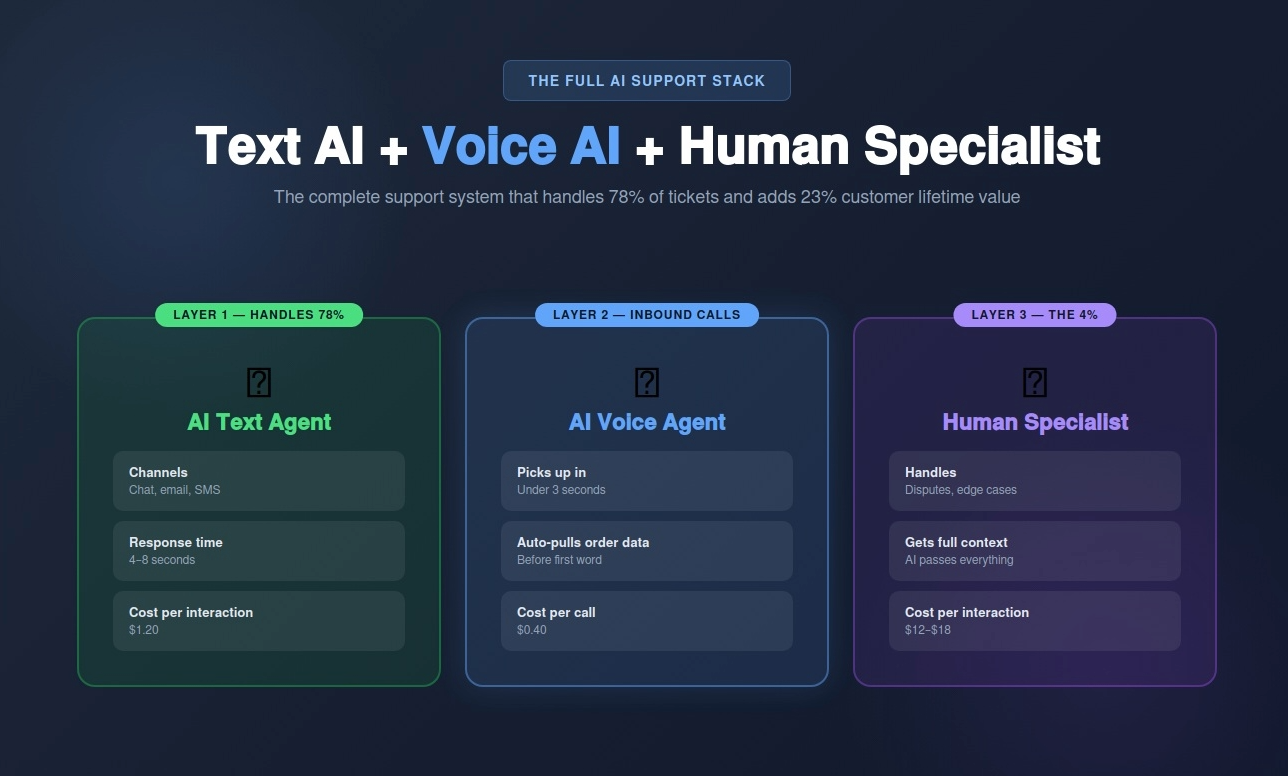
The problem: You're paying $3,400+/month for tools that organize tickets. Your 4 agents are answering the same 40 questions 780 times a month. Response times are measured in hours. And 96% of what comes in is answerable by AI in seconds.
The math: 780 tickets × $18/ticket = $14,040/month in support costs. Three-quarters of those tickets don't need a human at all.
The solution: AI that resolves 78% of tickets autonomously, responds in seconds, and hands off the hard stuff to a specialist with full context. Add an AI voice layer for inbound calls, and your support system becomes a competitive advantage instead of a cost center.
Skincare brand results:
The choice:
Keep paying $14K/month to manage a ticket backlog that never shrinks — or deploy AI that clears 78% of it in seconds and makes your customers happier in the process.
Ready to see what this looks like for your store?
Book your free support audit →
We'll look at your current ticket volume, map out exactly which tickets AI handles vs which need humans, and give you a clear picture of what you'd save — including the voice agent layer.
No commitment. No sales pitch. Just an honest look at where the money is going and how to get most of it back.
Email: renzo@rdcgroup.co
Website: rdcgroup.co