Most e-commerce chatbots fail because AI tries to answer everything. Here's the human-in-the-loop setup that handles 70% of tickets automatically while keeping customers happy on the 30% that matter most.
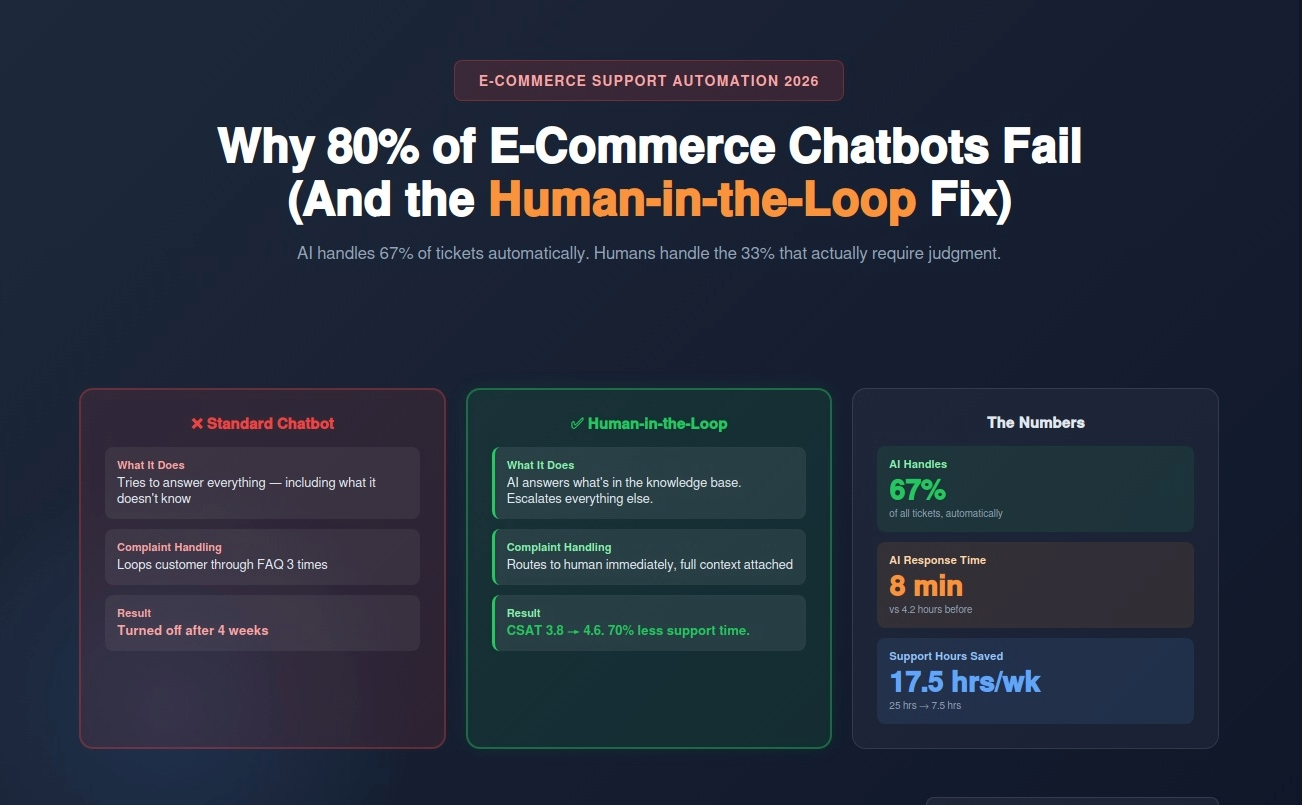
An e-commerce brand owner told me she almost turned off her AI chatbot after three weeks. Customers were getting wrong answers, a few were publicly complaining, and her support team was spending more time cleaning up chatbot mistakes than they would have spent just answering the questions themselves.
She didn't have a bad chatbot. She had a chatbot that was trying to answer everything.
I'm Renzo, founder of RDC Group. We build customer support automation systems for e-commerce brands using n8n, Airtable, and Chatwoot. The number one thing I've learned building these systems is this: the AI chatbot failures people complain about almost always come from the same mistake — letting AI handle everything instead of building in a clear, fast path to a human when the AI shouldn't be the one answering.
This guide covers exactly how to build a support system that handles 60-70% of tickets automatically, escalates the rest to humans intelligently, and keeps your customers from ever feeling like they're stuck in a loop.
It's not the technology. Modern AI is genuinely capable of answering product questions, tracking orders, explaining return policies, and handling most pre-sales inquiries. The technology works.
The problem is deployment strategy. Most chatbot deployments go wrong in one of three ways.
Wrong #1: The chatbot tries to answer things it doesn't know.
If your chatbot's knowledge base doesn't include the answer, it has two options: say "I don't know" or hallucinate a plausible-sounding answer. Most chatbots, especially those built on general-purpose LLMs without proper grounding, do the latter. A customer asks about a specific product compatibility issue. The AI makes something up. The customer buys based on bad information. They return the product frustrated. You've now lost money and trust.
Wrong #2: There's no escalation path.
Customer has a legitimate complaint about a damaged item. Chatbot loops them through the returns FAQ three times because it was trained to resolve tickets, not escalate them. Customer gets angry, posts on social media, and becomes a case study for why AI customer support doesn't work.
Wrong #3: The knowledge base is stale.
You launched the chatbot with your product catalog from 3 months ago. You've added 40 new products since then. Customer asks about a new item. Chatbot confidently says you don't carry it. You do.
These aren't AI failures. They're design failures. And they're completely fixable.
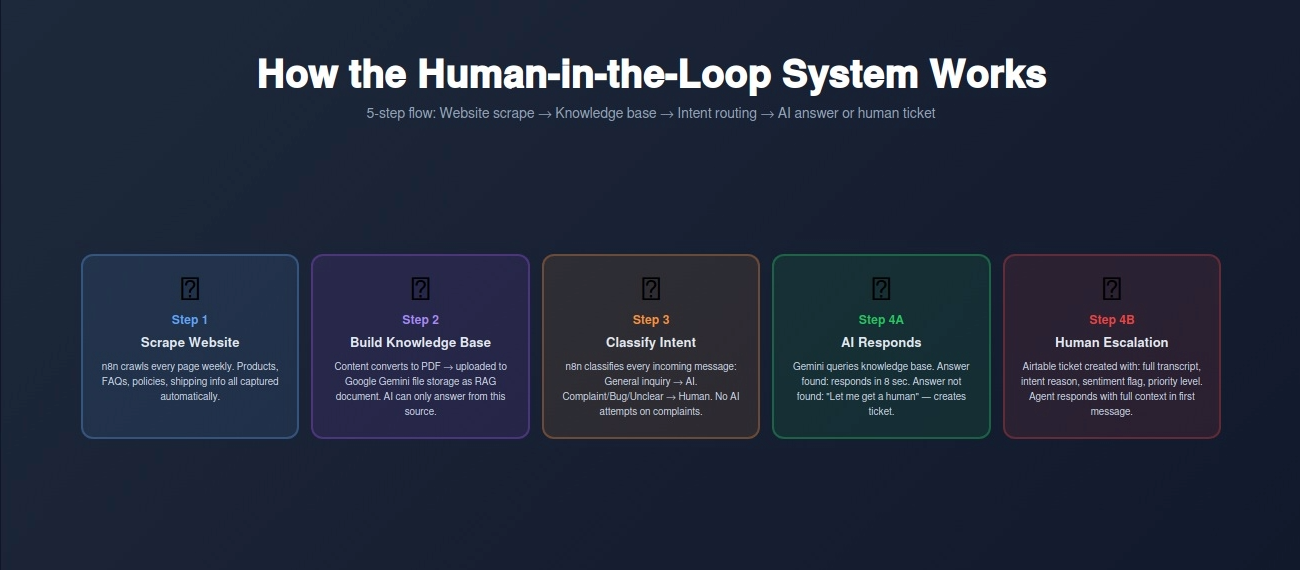
The system we build for e-commerce brands uses three components: a knowledge base built from the client's actual website content, an AI layer that handles questions it can confidently answer, and a human escalation layer that catches everything else.
Here's how it works step by step.
Step 1: Build the Knowledge Base Automatically
We start by scraping the client's entire website — product pages, FAQ, shipping policy, return policy, contact page, about page — using n8n. The scraper runs on a schedule (weekly by default, or triggered manually after product updates) so the knowledge base never goes stale.
All scraped content gets converted into a standardized PDF document. That PDF uploads to Google Gemini's file storage, where it becomes the AI's grounding document. This is called RAG — Retrieval-Augmented Generation. Instead of the AI relying on its training data (which might be outdated or wrong), every answer it gives is grounded in your actual current website content.
If the answer isn't on your website, the AI says so and escalates. That's the key design decision: the AI is not trying to be clever or fill in gaps. It answers what's there and escalates what isn't.
Step 2: Route Incoming Messages by Intent
When a customer message comes in through Chatwoot (our preferred customer support platform), n8n first classifies the intent. There are two primary categories.
Category A — General inquiry: Product questions, shipping questions, return policy questions, pre-sales questions. These are questions that have answers somewhere on your website. The AI handles these with high confidence because it's pulling from your actual content.
Category B — Complaint, bug, or unclear intent: A customer saying "this is broken," "I never received my order," "wrong item was delivered," "I need to speak to someone." These go to a human. Not to the AI first, not through 3 FAQ loops, and not with a delay. Directly to a human support ticket.
The routing logic is simple: any message containing language associated with dissatisfaction, personal account-specific issues, or complex troubleshooting gets flagged for human handling. The AI doesn't attempt to resolve these. Attempting to resolve a complaint with an AI often makes it worse.
Step 3: AI Handles General Questions
For Category A messages, the AI queries the knowledge base and responds with a specific, grounded answer. No hallucination, because there's no room for the AI to guess — it either finds the answer in the document or it doesn't.
When it finds the answer: it responds with the information plus a follow-up question to confirm the customer's issue is resolved.
When it doesn't find the answer: it responds honestly — "I don't have that information in our current resources. Let me connect you with someone who can help directly." Then it creates a ticket.
This honesty is important. Customers who get an "I don't know, let me get you a human" response are far less frustrated than customers who get a confident wrong answer.
Step 4: Human Escalation with Full Context
When a ticket escalates to a human, the support agent doesn't start from scratch. The Airtable record that n8n creates includes: the customer's name and contact info, the full chat transcript, the intent classification (why it was escalated), the AI's previous response (if it attempted an answer before escalating), and a priority flag based on sentiment (a customer who used the word "furious" gets a higher priority flag than one who said "confused").
The human support agent opens the ticket with full context. They're not reading through 10 minutes of chatbot loops to understand what happened. They see: customer name, issue summary, escalation reason, previous conversation. They can respond meaningfully in 60 seconds.
Step 5: Ticket Resolution and Loop Closing
Once a human resolves the ticket in Chatwoot, n8n updates the Airtable record with the resolution, response time, and resolution type. Over time, patterns emerge: if 30% of escalations are about the same product issue, that's a signal to update the FAQ or the product page. The data from your support tickets actively improves your knowledge base and product content.
A customer lands on your website at 10 PM looking at running shoes. They want to know if a specific model works for wide feet.
That question — specific product suitability — is a general inquiry. The AI checks the knowledge base (your product pages), finds the width specification for that shoe, and responds: "Yes, that model comes in wide widths and runs true to size. Customers with wide feet have found it comfortable out of the box. Would you like to know about return options if the fit isn't right?"
Same customer, different scenario: they ordered that shoe last week and it arrived with a manufacturing defect. They message your support chat furious about it.
The intent classification picks up complaint language. This immediately creates a ticket, routes to human, and flags it high priority. No AI response attempt. A human sees it first thing in the morning, responds with an apology and a replacement offer, and the customer becomes someone who tells their friends your customer service is excellent.
That split — AI handles what AI is good at, humans handle what humans need to handle — is the entire architecture.
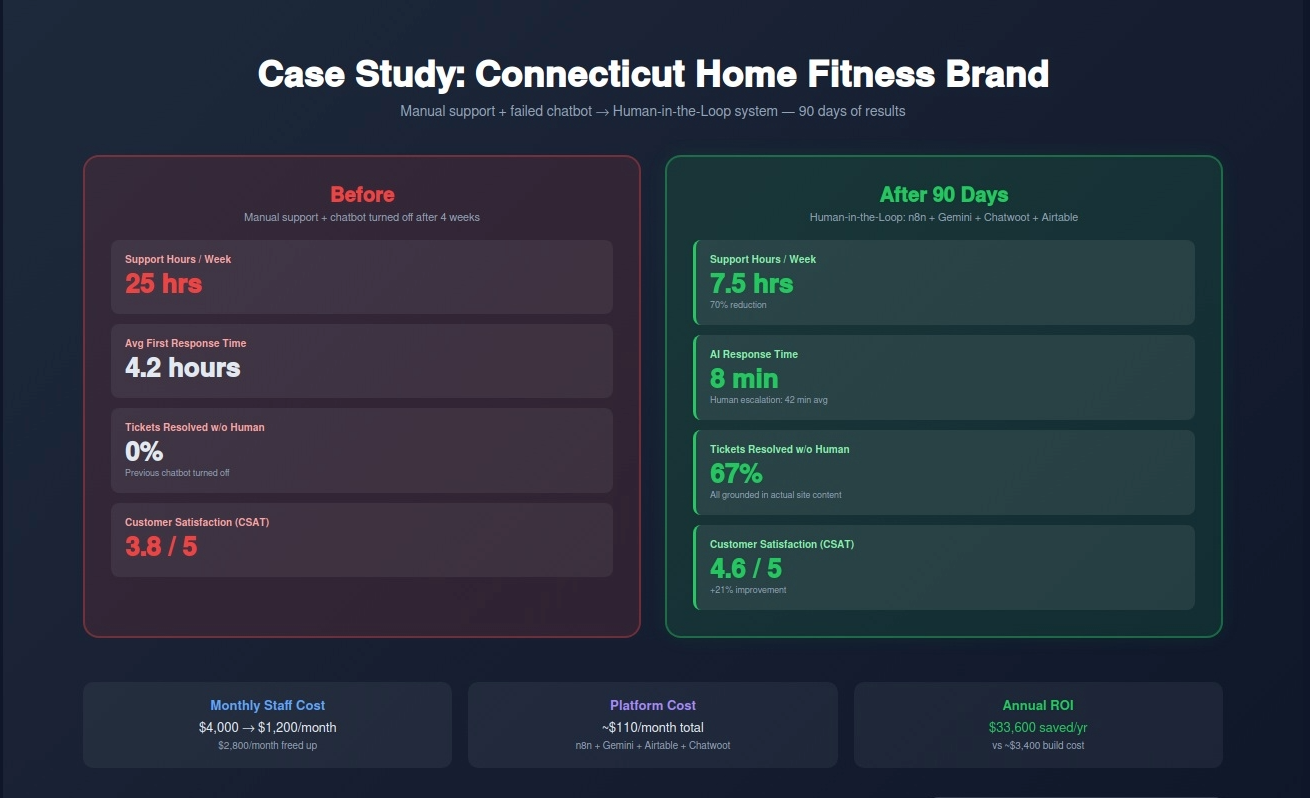
A Connecticut e-commerce brand selling home fitness equipment came to us with a specific problem: their support team was spending 25 hours per week answering questions, the vast majority of which were the same 15 questions on repeat. Size guides, shipping timelines, return policies, product compatibility.
They had tried a standard chatbot 6 months earlier. It lasted 4 weeks before they turned it off — customers kept getting wrong answers about product specs that had since been updated.
We built the human-in-the-loop system described above. Here are the results after 90 days.
Before (manual support + previous failed chatbot): Hours spent on support per week: 25 hours Average first response time: 4.2 hours Tickets resolved without human: 0% (chatbot turned off) Customer satisfaction score: 3.8/5 Monthly support cost (staff time): ~$4,000
After (human-in-the-loop system): Hours spent on support per week: 7.5 hours Average first response time: 8 minutes (AI) / 42 minutes (human escalation) Tickets resolved without human: 67% Customer satisfaction score: 4.6/5 Monthly support cost (staff time): ~$1,200
The 70% time reduction came entirely from the AI handling general inquiries. The human support team now spends almost all of their time on tickets that actually require human judgment — complaints, complex issues, returns with unusual circumstances. The routine stuff is gone from their queue.
The customer satisfaction improvement came from two things: faster response times (8 minutes vs 4+ hours for general questions) and better human responses (agents have full context when they open tickets, so they can respond meaningfully on the first message rather than asking clarifying questions).
❌ Mistake 1: Letting AI Attempt Complaint Resolution
The most common deployment mistake. A customer writes "this product broke after 2 weeks." The AI tries to help: "I'm sorry to hear that! Please review our return policy at [link]." Customer is already frustrated. Being sent to a FAQ link by a bot makes it worse. Complaints go to humans. No exceptions.
❌ Mistake 2: Building the Knowledge Base Once and Forgetting It
You built the chatbot in January. It's July. You've added 60 products, changed your return policy, and updated your shipping carrier. The chatbot is still answering based on January's information. The scraper needs to run on a schedule — weekly minimum, after every major product update. This is automated with n8n, but someone needs to confirm it's running.
❌ Mistake 3: No Fallback When Confidence Is Low
If your AI's confidence in an answer is below a certain threshold, it should say so and escalate rather than give a low-confidence answer. Most chatbot platforms have confidence scoring. Use it. Set a threshold — we typically use 80% — below which the AI defers to a human rather than guessing.
❌ Mistake 4: Measuring Only Response Time, Not Resolution Quality
Fast responses that give wrong answers are worse than slightly slower correct ones. Measure both speed and resolution quality. A 2-minute response that sends the customer on a 20-minute wild goose chase is not a good outcome. Track: did the customer's issue get resolved in the first interaction, and did they come back with the same question?
❌ Mistake 5: Not Training Your Human Team on the New Workflow
You deploy the AI system. Your human support team doesn't change their behavior — they're still checking the old support email every hour instead of monitoring the Airtable escalation queue. The system works, but the human response time is slow because your team doesn't know where to look. Training takes 2 hours. Do it before launch.
Week 1: Content Audit and Knowledge Base Build
Pull all support content from your website: product pages, FAQs, shipping and return policies, contact information. Identify gaps — questions your team gets frequently that aren't answered clearly on the site. Fill those gaps in your website content before building the chatbot (better content = better AI answers). Set up the n8n scraper workflow that converts your site content into a grounded knowledge document.
Week 2: Platform Setup and Intent Classification
Set up Chatwoot for your support channels (website chat, email, social if applicable). Configure the n8n workflow to classify incoming messages by intent. Start with a simple binary: general inquiry vs needs human. You can refine classification into more categories later, but start simple. Connect Airtable as your ticket and escalation tracking database.
Week 3: AI Response Layer
Connect your knowledge document to the AI layer (Google Gemini works well here given its large context window and ability to process PDFs natively). Build the response templates for: answer found, answer not found (escalate), and confirmation follow-up. Test with 50 sample messages — 30 general inquiries, 20 complaints. Review every response for accuracy and tone.
Week 4: Human Escalation System
Build the escalation workflow: sentiment detection → ticket creation in Airtable → notification to human support team → full context handoff. Set up priority flagging (high priority for any message with negative sentiment markers). Build the resolution feedback loop: when a human closes a ticket, the resolution logs to Airtable for pattern analysis. Go live with a soft launch — route 20% of traffic to the new system for 48 hours before full rollout.
Build (One-Time): $2,800-$4,500 Includes: website scraper setup, knowledge base pipeline, intent classification logic, AI response layer, human escalation workflow, Airtable ticket system, Chatwoot configuration, sentiment detection, priority flagging, and team training.
Monthly Maintenance: $280-$450/month Knowledge base refresh scheduling, monitoring classification accuracy, updating intent triggers as new inquiry types emerge, and adding new product lines to the knowledge base.
Platform costs (paid by you): n8n Cloud: $50/month. Airtable: $20-45/month. Chatwoot: $0 (open source self-hosted) or $25-75/month cloud. Google Gemini API: typically $10-30/month for e-commerce support volumes. Total platform costs: roughly $80-150/month.
If your support team is answering the same questions 30 times a week, your chatbot is doing nothing (or making things worse), or you're paying staff to do work that a properly-built AI system handles in seconds — this is the solution.
Free Support Automation Assessment
We'll review your current support setup and show you:
Contact: Email: renzo@rdcgroup.co Phone: (860) 968-0135 Website: rdcgroup.co
Book Your Free Support Automation Assessment →
No commitment. No sales pitch. Just a clear picture of how many hours you could reclaim and what it would cost to get there.
RELATED: How One Ecommerce Brand Cut Customer Support Time 70% with AI Customer Support Automation
RELATED: Live Chat Automation for Connecticut Ecommerce: 100% Response Rate, 35% Higher Conversions