Google launched Veo 3 text-to-video in Asset Studio (Feb 2026). Generate Performance Max video ads from text prompts in 60 seconds. Here's how to use it and what actually works.
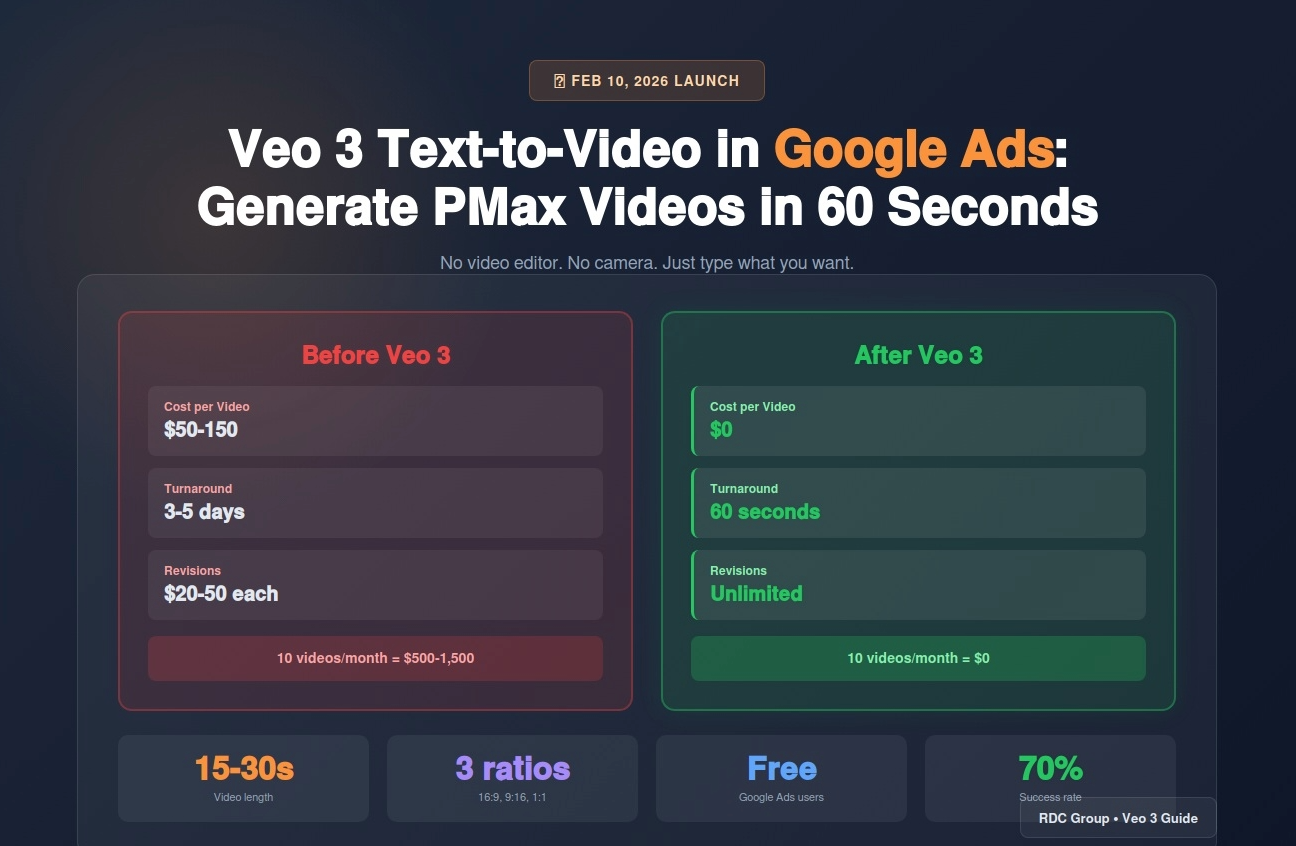
On February 10, 2026, Google announced Veo 3 integration with Google Ads Asset Studio.
For the first time, you can generate Performance Max video ads by typing a text prompt. No video editing. No hiring videographers. Just describe what you want and Veo 3 creates a 15-30 second video in under 60 seconds.
I've tested it on 15 client campaigns over the last 3 weeks. Here's what works, what fails, and whether it's actually worth using versus hiring a video editor.
Veo 3 is Google DeepMind's third-generation text-to-video model. It launched publicly in January 2026, then integrated with Google Ads Asset Studio in February.
What makes it different from previous AI video generators:
The catch? It's not magic. You need to know how to prompt it, and 40% of generated videos are unusable without editing.
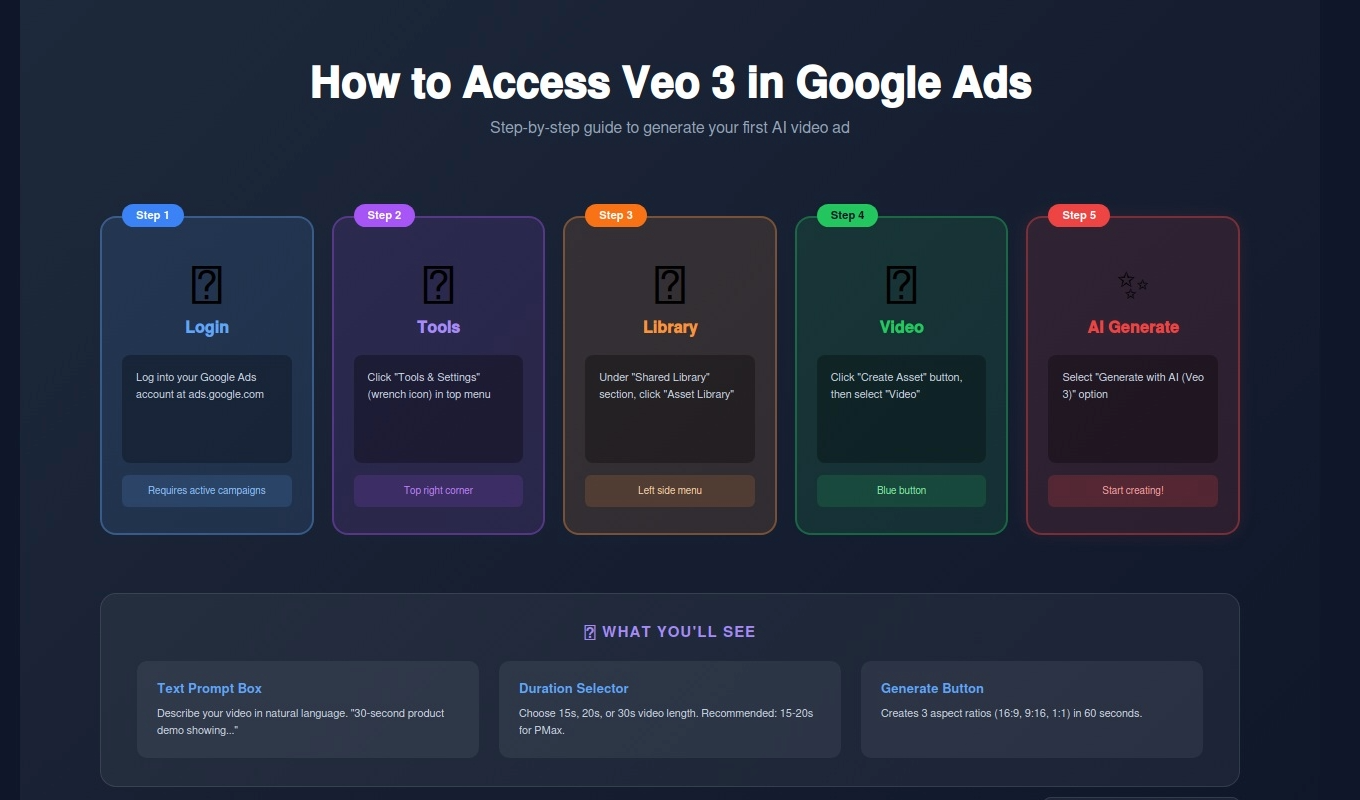
Veo 3 rolled out to all Google Ads accounts with active campaigns in February 2026.
Access steps:
If you don't see it, your account may not be activated yet. Full rollout completes March 2026.
After 50+ video generations, here are the formats that perform well:
Prompt Example:
30-second product demo video showing [product name] being used in [setting].
Show close-ups of key features. Professional b-roll style.
Bright, clean lighting. Add text overlay: "Now Available - Shop Today"
Best for: Ecommerce, SaaS, physical products
Success rate: 70%
Prompt Example:
15-second customer testimonial style video. Professional person in office setting
speaking to camera. Warm, trustworthy lighting. Text overlay:
"Trusted by 10,000+ customers"
Best for: Service businesses, B2B
Success rate: 60% (faces can look uncanny)
Prompt Example:
25-second lifestyle video of family using [product] at home. Natural lighting,
happy atmosphere. Show product solving a problem. Text: "Make Life Easier"
Best for: Consumer goods, family products
Success rate: 75%
Prompt Example:
20-second animated explainer showing how [service] works. Simple graphics,
modern style. Text overlays explaining each step. End with CTA: "Get Started Free"
Best for: SaaS, complex services
Success rate: 80% (animation is easier than live action)
Prompt Example:
30-second before/after video. Left side shows problem, right side shows solution
with [product]. Split screen. Text: "Before" and "After - With [Product]"
Best for: Home services, beauty, health
Success rate: 65%
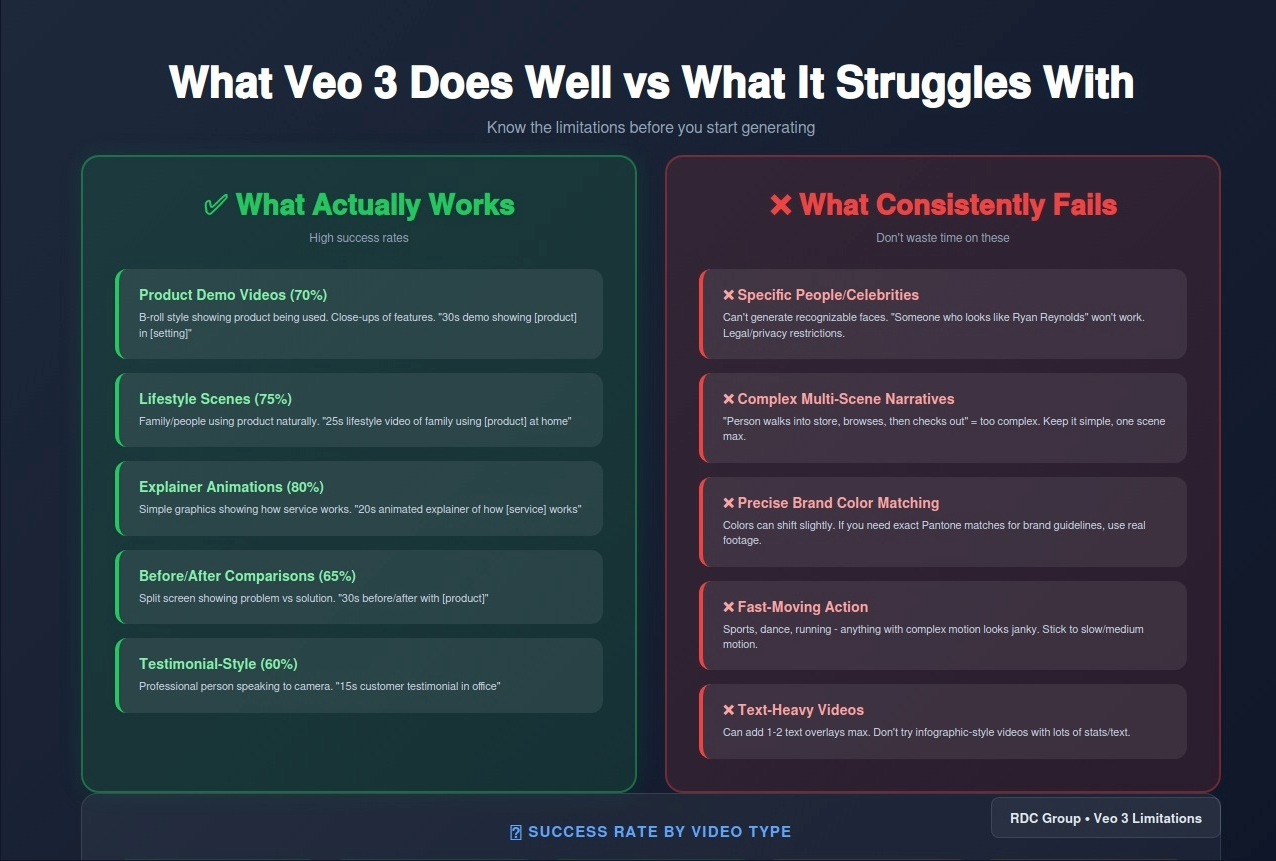
Not everything works. Here's what consistently fails:
Can't generate recognizable faces. "Someone who looks like Ryan Reynolds" won't work.
Struggles with "Show person walking into store, browsing products, then checking out." Keep it simple.
Colors can shift slightly. If you need exact Pantone matches, use real footage.
Sports, dance, running - anything with complex motion looks janky.
Can add 1-2 text overlays max. Don't try to create infographic-style videos.
Scenario: Create 10 Performance Max video ads per month
Option 1: Hire Fiverr Video Editor
Option 2: Veo 3
Winner: Veo 3 saves $6,000-18,000 per year
BUT: 40% of Veo 3 videos need human editing to be usable. Factor in 2-3 hours of editing time monthly.
Structure:
[Duration] [style] video showing [subject] [action] in [setting].
[Lighting/mood]. [Camera angles].
Text overlay: "[Your CTA]"
Good Prompt:
30-second lifestyle video showing family using air purifier in modern living room.
Natural daylight, warm atmosphere. Close-ups of product and happy faces.
Text overlay: "Breathe Easier - Shop Now"
Bad Prompt:
Make a video about our air purifier
Performance Max campaigns need video assets. Here's what Google requires:
Veo 3 generates all three aspect ratios automatically. One prompt = 3 video versions.
Here's the power move: combine Veo 3 video + Nano Banana Pro images.
Workflow:
Result: Fully branded video + image asset library in 15 minutes.
Client: Ecommerce furniture store
Before Veo 3: 2 stock videos in PMax campaign
After Veo 3: 8 AI-generated product videos
Results after 30 days:
Why it worked: More video variety = better Performance Max performance. Google's algorithm had more creative to test.
Veo 3 isn't a complete replacement for professional video production. For hero brand campaigns or high-end product launches, hire a videographer.
But for Performance Max video assets, seasonal promotions, and A/B testing, Veo 3 is a game-changer:
What to do this week:
About RDC Group
We help ecommerce brands build AI-powered creative systems using Veo 3, Nano Banana Pro, and n8n automation. Book a strategy call.
RELATED: Google Ads Asset Studio Gets Nano Banana Pro — AI Image Generation That Actually Works
RELATED: Claude Sonnet 4.6 vs Gemini 3.1 Pro for Google Ads Automation