Most business owners think Google Ads automation means letting Google's algorithm burn through your budget while you hope for the best. They've heard horror stories about...
Most business owners think Google Ads automation means letting Google's algorithm burn through your budget while you hope for the best. They've heard horror stories about "Maximize Conversions" campaigns that spent $10,000 in three days on junk traffic, or Performance Max campaigns that turned into black boxes eating ad spend with no transparency.
Here's what they don't realize: AI Google Ads automation done correctly can reduce management time by 70% while improving ROAS by 20-40%.
The difference isn't whether you automate. It's how you automate and what you automate.
In this guide, I'll break down the three levels of Google Ads automation—from Google's native tools to custom AI workflows—and show you exactly where automation saves money versus where it wastes it. If you're spending $5,000-$50,000 monthly on Google Ads, this article will show you how to cut management costs by $3,000-$8,000 per month while getting better results.
Before we dive into strategies, let's clarify what we're talking about. There are three distinct levels of automated Google Ads management, and most businesses only know about the first one—which is also the most dangerous.
Level 1: Google's Native Automation
This is what Google wants you to use: Smart Bidding, Responsive Search Ads, Performance Max campaigns, and those "auto-apply recommendations" that are turned on by default in your account. Some of these tools are genuinely useful. Others are designed to maximize Google's revenue, not your ROAS.
Level 2: Third-Party Automation Tools
Platforms like Optmyzr, Adalysis, and SEMrush offer rule-based automation that sits on top of Google Ads. These tools can automate bid adjustments, pause underperforming keywords, and generate reports. They're better than manual management but limited by their pre-built rules that don't understand your specific business context.
Level 3: Custom AI Automation
This is where Connecticut businesses are seeing 40-60% cost reductions: custom workflows built using tools like n8n, Make, or direct API integrations. These systems pull data from your CRM, inventory system, calendar, competitor pricing, weather data—and make intelligent decisions based on your business logic, not Google's.
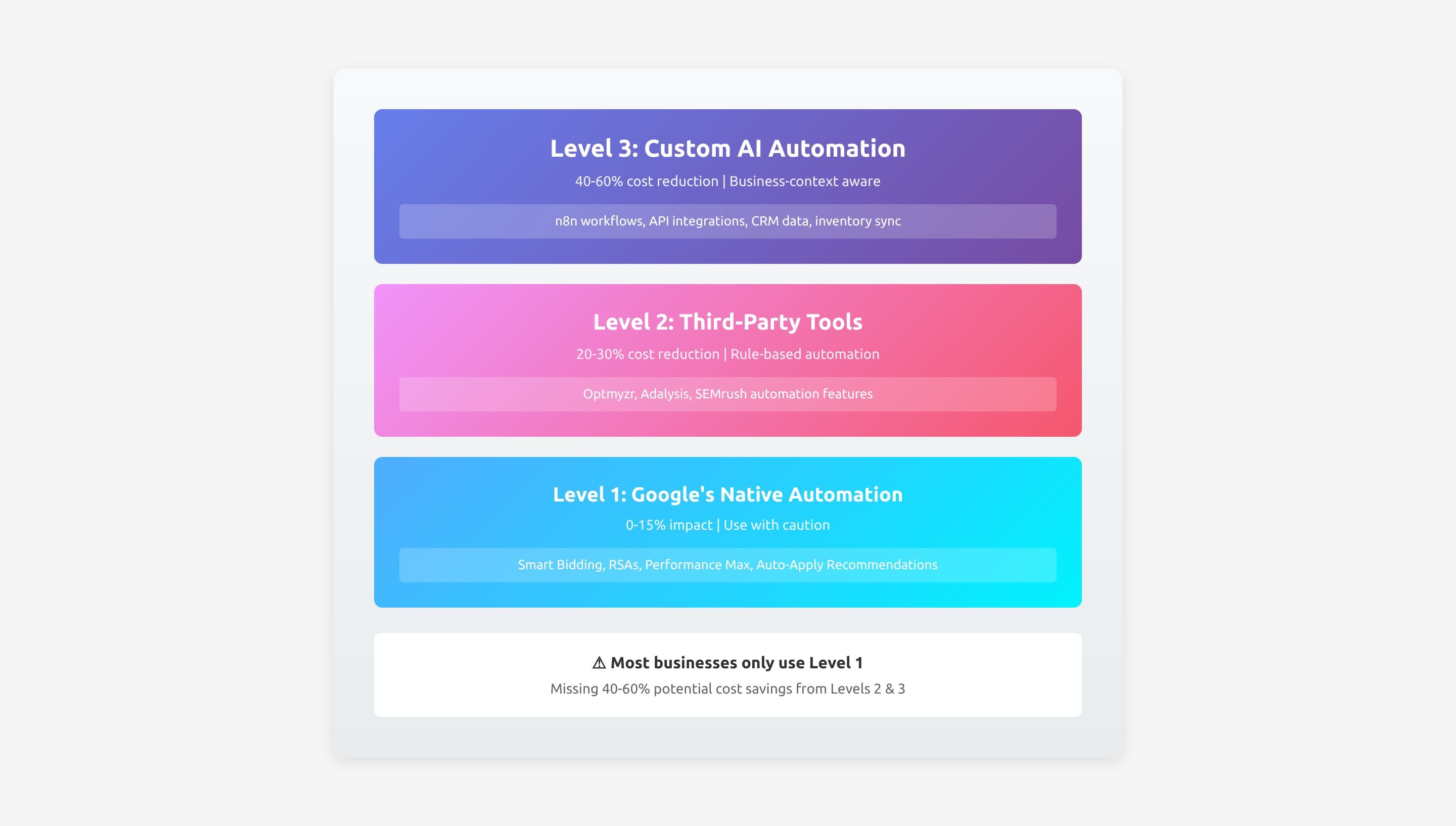
Most businesses stop at Level 1 and wonder why their AI PPC management isn't delivering results. The truth is, you need to understand all three levels and know when to use each one.
Let's start with Google's built-in Google Ads automation tools because you'll need to use some of them—and avoid others entirely.
Smart Bidding for Target ROAS (When You Have Data)
If you're getting at least 50 conversions per month in a campaign, Google's Smart Bidding can genuinely improve performance. I've seen Target ROAS bidding improve returns by 18-25% for ecommerce clients with solid conversion tracking.
The key is having enough conversion data. If you're getting 10 conversions per month, Smart Bidding is just guessing. You're better off with manual bidding or Maximize Clicks until you have the volume.
Real example: A Connecticut ecommerce client selling woodworking products was using manual CPC bidding across 8 campaigns. After switching their two highest-volume campaigns (120+ conversions/month each) to Target ROAS bidding at their historical 380% ROAS, Google improved it to 467% ROAS over 60 days. The algorithm found bid opportunities humans were missing—late-night traffic, specific device combinations, geographic micro-targeting.
But their low-volume campaigns (15-20 conversions/month)? Smart Bidding tanked performance by 34% because there wasn't enough data.
Responsive Search Ads (RSAs)
RSAs let you provide multiple headlines and descriptions, and Google tests combinations to find what performs best. This actually works—but only if you write good copy to begin with. Garbage in, garbage out.
The benefit: Google can test 100+ combinations faster than you can manually A/B test. I typically see CTR improvements of 12-18% when switching from standard text ads to well-written RSAs.
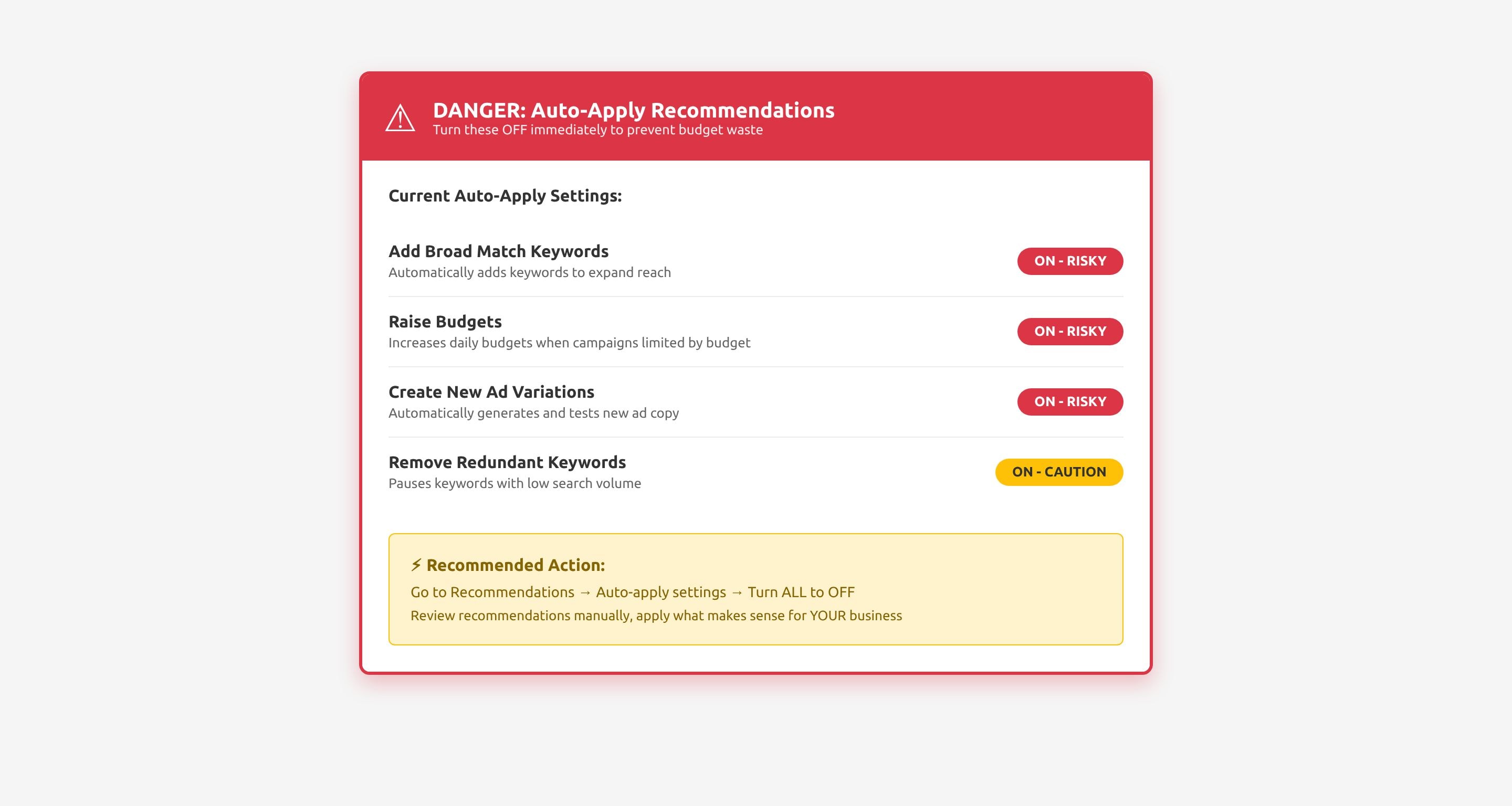
Auto-Apply Recommendations (THE DANGER ZONE)
This "feature" is turned ON by default in most Google Ads accounts, and it's a disaster waiting to happen. Google will automatically apply its recommendations to your account—adding keywords, changing bids, creating new ad variations—without asking you.
Real disaster story: A law firm client came to me after their monthly Google Ads spend jumped from $11,000 to $15,400 in one week. Google had auto-applied a recommendation to "expand keyword targeting" which added 47 broad match keywords to their campaigns. Most were junk—"free legal advice," "law school," "legal internships." They paid $4,400 for clicks that generated zero cases.
First thing you should do right now: Go to Recommendations → Auto-apply → Turn everything OFF.
"Maximize Conversions" Without Constraints
This bidding strategy sounds great: let Google get you the most conversions possible. The problem? Google will spend your entire budget getting low-quality conversions if you don't set constraints.
I've seen this blow through a $20,000 monthly budget in 11 days chasing $9 product purchases that cost $80 in ad spend to acquire. Google got "conversions"—they were just unprofitable conversions.
If you use Maximize Conversions, you MUST set a Target CPA constraint. Otherwise, you're giving Google a blank check.
Performance Max Without Proper Asset Groups
Performance Max can work, but it's a black box. You can't see search terms, you can't control placements, and if you don't set up asset groups correctly, Google will show your ads anywhere it wants.
One client's Performance Max campaign showed their professional B2B service ads in mobile game apps to teenagers. Google got clicks (and charged them), but conversion rate was 0.02%.
The Rule: Use Google's automation where it has enough data to make smart decisions. Override it where you have business context Google doesn't know about.
This is where custom Google Ads automation delivers 40-60% cost reductions that third-party tools and Google's native features can't match.
Real scenario: Connecticut law firm spending $18,000/month on Local Services Ads + Search campaigns.
The problem they didn't realize they had:
Their bids stayed constant 24/7, even though their business capacity fluctuated dramatically. When their caseload was full or key attorneys were on vacation, they were still paying for leads they couldn't handle. When they had capacity and needed cases, bids didn't increase to capitalize on the opportunity.
The custom automation solution:
We built an n8n workflow that:
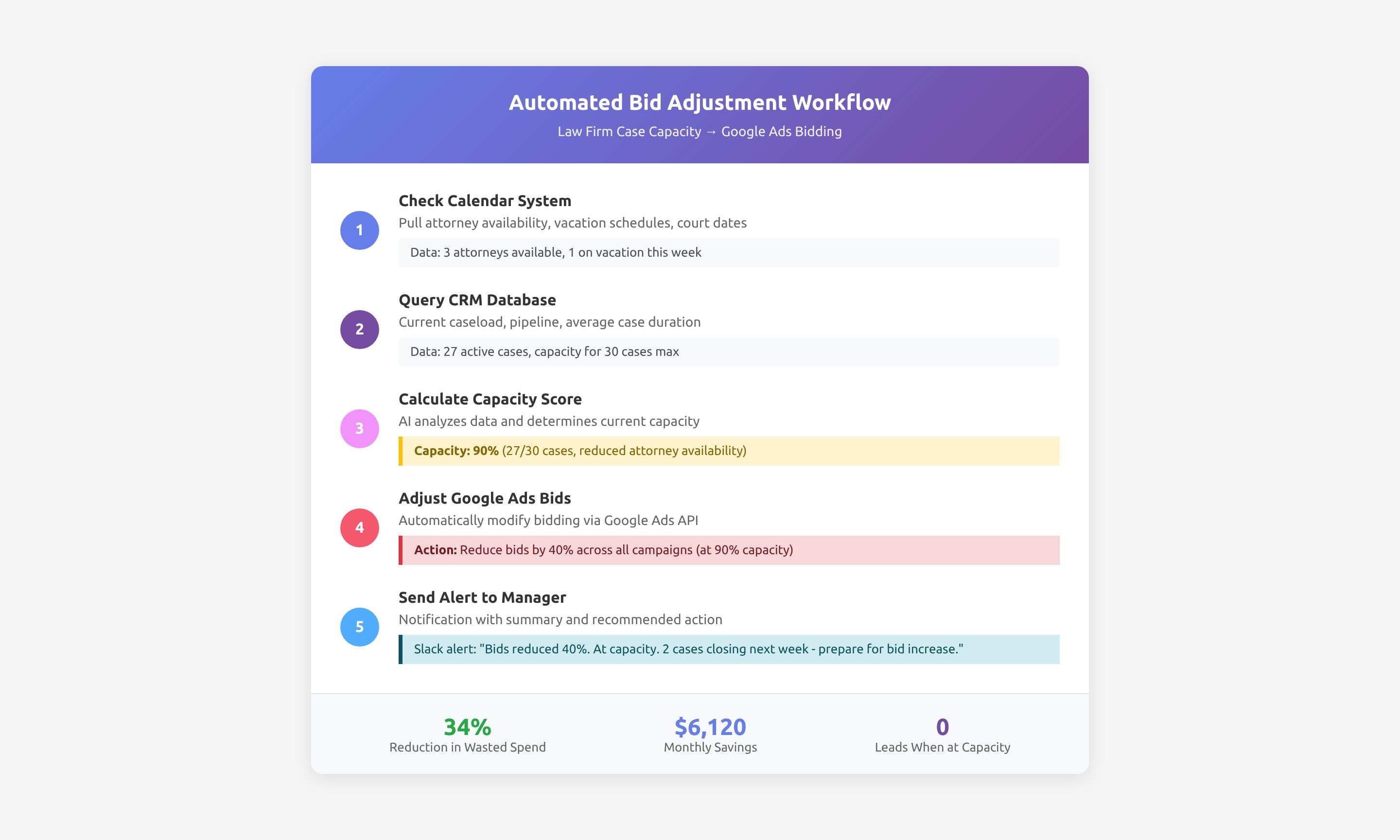
Results after 90 days:
This is the type of AI Google Ads automation that Google's tools can't do because Google doesn't know your business context.
Real scenario: Ecommerce business with 15 campaigns across different product categories, spending $32,000/month total.
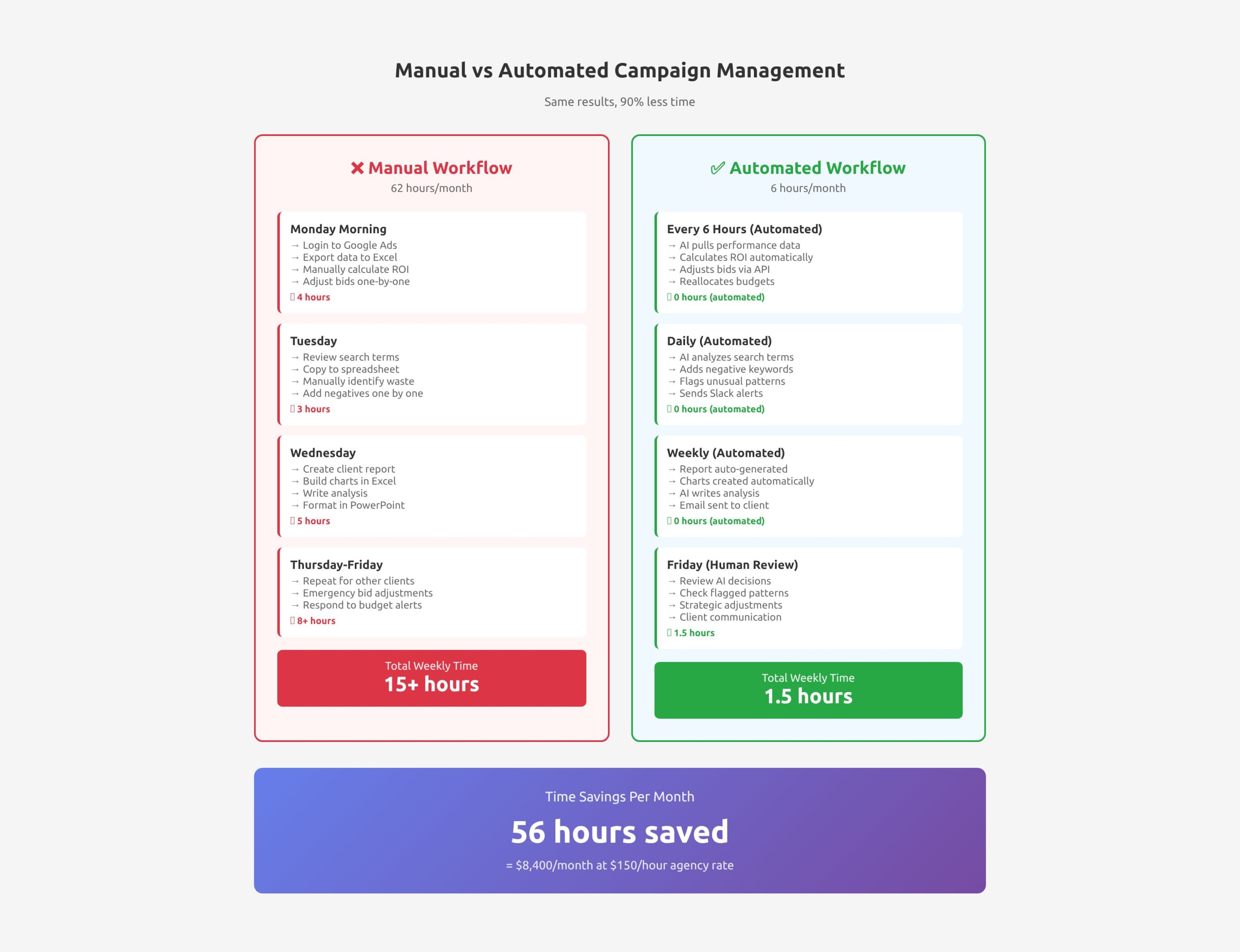
The manual nightmare: Account manager spent 3-4 hours every Monday reallocating budgets between campaigns based on last week's performance. By the time budgets were adjusted, opportunity was already lost.
The automated solution:
Custom workflow that runs every 6 hours:
Results:
Most agencies do this manually: export search terms weekly, scan for waste, add negatives. It takes 2-3 hours weekly and misses a lot.
Automated version:
Real results from ecommerce client:
For ecommerce businesses where pricing is competitive:
The workflow:
Result for furniture retailer: Cost per conversion down 19%, conversion rate up 12% (because they're only aggressive when price-competitive)
For businesses where weather drives demand (landscaping, HVAC, construction, outdoor recreation):
The automation:
Result for Connecticut landscaping company:
After implementing Google Ads automation strategy for dozens of clients, here's what I've learned about the boundaries:
Routine Bid Adjustments Based on Rules
Budget Reallocation Between Campaigns
Negative Keyword Additions (With Review Queue)
Ad Scheduling Adjustments
Performance Reporting and Anomaly Detection
Search Term Analysis and Categorization
Quality Score Monitoring and Alerts
Major Strategy Pivots
Ad Copy Creation Without Human Review
Budget Increases Beyond Pre-Set Limits
Pausing Profitable Campaigns (Without Alerts)
Landing Page Changes
The Golden Rule of AI Google Ads Automation: Automate execution and monitoring. Keep humans in strategy, creative, and major decisions.
Let's get specific about costs because this is where automated Google Ads management shows its true value.
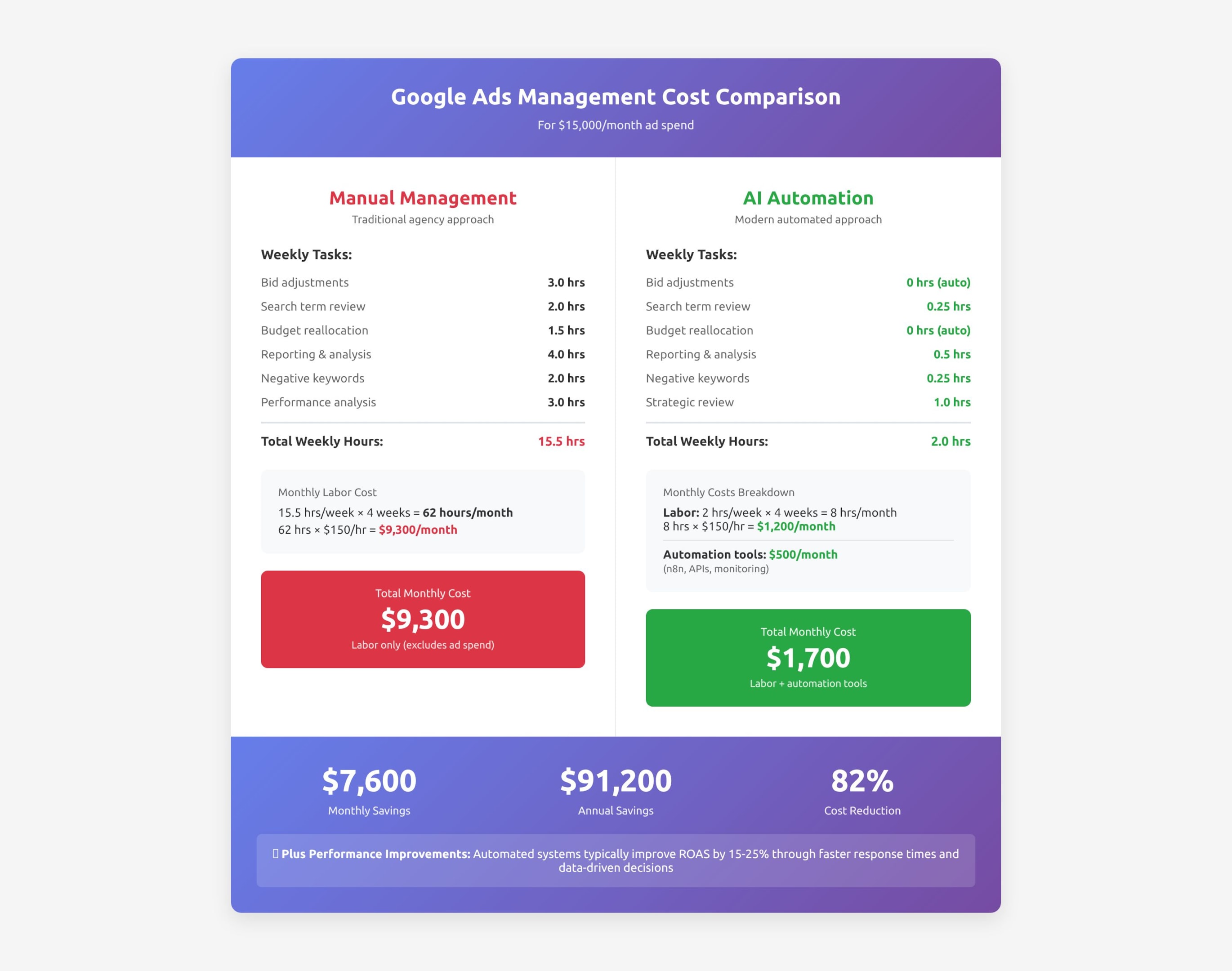
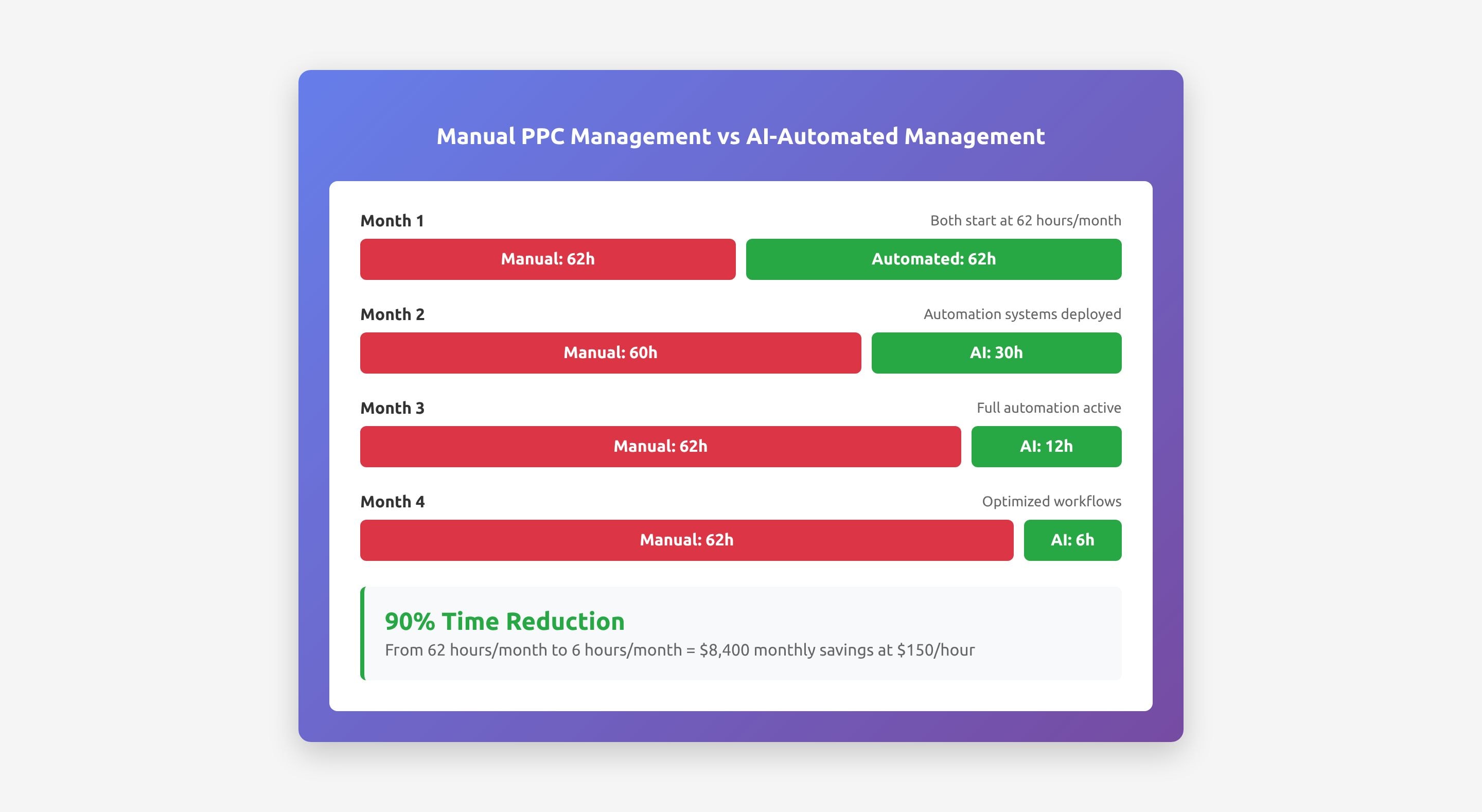
Total: 15.5 hours/week = 62 hours/month
At $150/hour agency rate: $9,300/month in labor costs
Total monthly cost: $1,400-$1,700
Monthly savings: $7,600-$7,900 ($91,200-$94,800 annually)
And this doesn't even account for the performance improvements. Automated systems typically improve ROAS by 15-25% because they respond to opportunities and problems in hours instead of days.
If you're ready to implement AI Google Ads automation, here's the realistic path forward:
Action items:
Deliverable: Written document showing where your time goes and what could be automated
Action items:
DO NOT:
Deliverable: Baseline performance metrics to compare against future automation
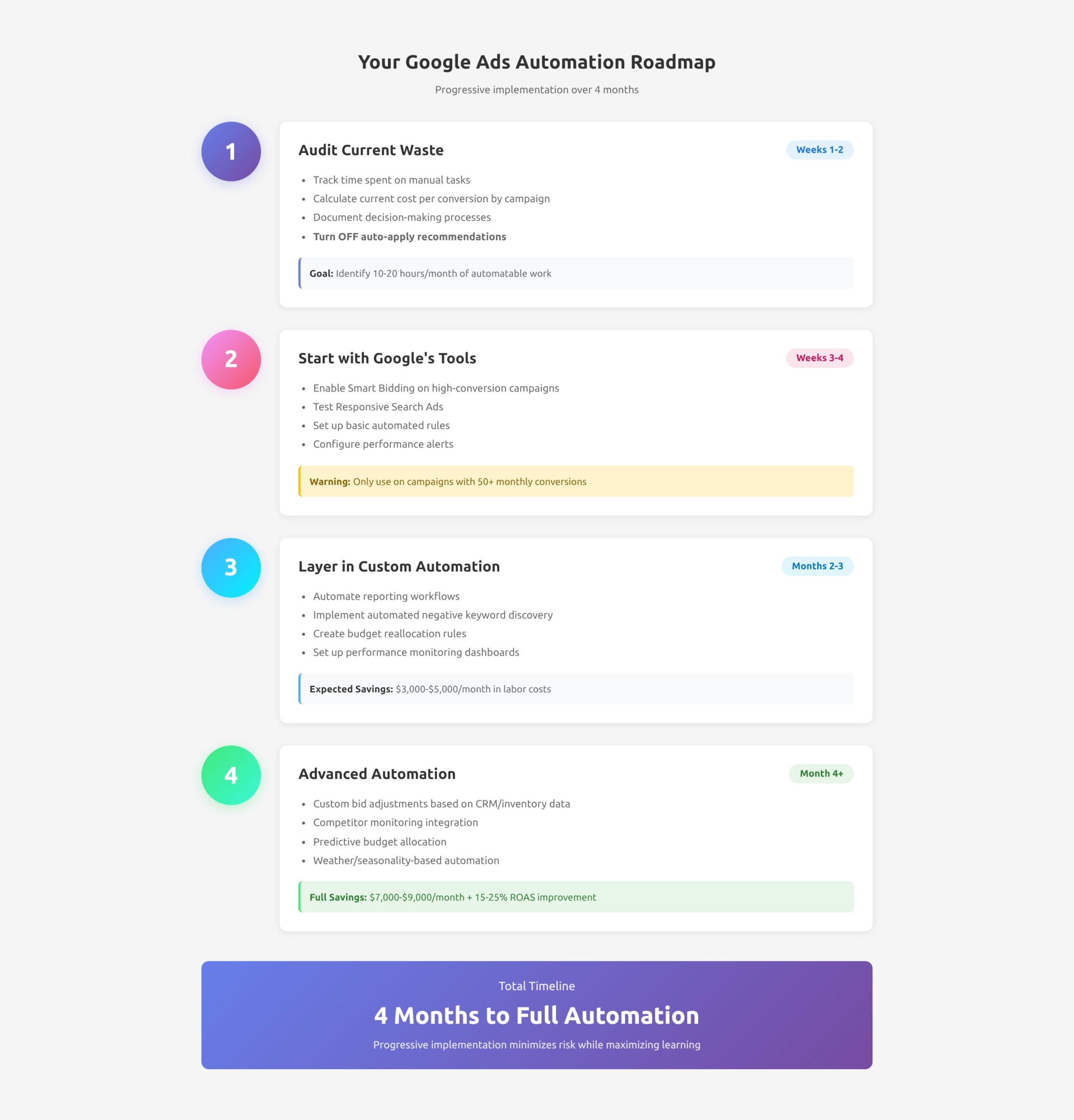
Action items:
Tools needed:
Expected savings: $3,000-$5,000/month in management time
Action items:
Tools needed:
Expected savings: $7,000-$9,000/month + 15-25% ROAS improvement
The Google Ads landscape is splitting into two worlds:
World 1: Agencies and businesses still doing everything manually, spending 50-60 hours monthly on tasks that could be automated, paying $8,000-$12,000/month for the privilege.
World 2: Agencies and businesses using intelligent automation, spending 6-8 hours monthly on strategic decisions, paying $1,500-$2,500/month, and getting better results.
Which world do you want to live in?
Here's what's happening as we head into 2026: businesses are getting smarter. They're realizing that "Google Ads management" shouldn't mean paying someone $150/hour to copy-paste data into spreadsheets or manually adjust bids one keyword at a time.
They're asking their agencies: "What are you actually doing that a computer can't do better?"
And if the answer is "most of it," they're finding agencies that have figured out automation.
The opportunity cost is staggering:
If you're spending $15,000/month on Google Ads and paying $9,000/month for manual management, you could be:
Over three years, that's $273,600 in savings plus compound growth from better performance.
The uncomfortable truth: If you're not exploring AI Google Ads automation right now, your competitors are. And in 12-18 months, the gap will be too wide to close without major disruption to your business.
The good news? You don't have to do it all at once. Start small:
By Month 6, you'll wonder how you ever managed Google Ads manually.
Most Connecticut businesses spending $5,000+ monthly on Google Ads can save $3,000-$8,000 per month through intelligent automation while improving campaign performance by 15-30%.
The businesses seeing the biggest impact are:
If you're currently paying an agency $6,000-$15,000/month for Google Ads management, or if you're spending 20+ hours weekly managing campaigns in-house, you're likely overpaying by 60-80% for work that could be automated.
Want a free automation audit? We'll analyze your Google Ads account and show you exactly:
The audit takes 30 minutes and you'll walk away with a clear picture of where you're wasting money and exactly how to fix it.
Article focused on AI Google Ads automation, automated Google Ads management, Google Ads automation tools, and AI PPC management strategies for Connecticut businesses and digital marketing agencies. Updated for 2026 automation best practices.