Learn how AI automation solves the "black box" problem and see how Connecticut businesses achieve 12-14X ROAS with automated optimization.
Performance Max campaigns are powerful but complex. Learn how AI automation solves the "black box" problem and see how Connecticut businesses achieve 12-14X ROAS with automated optimization.

If you manage Google Ads campaigns in Connecticut—whether for your own business or clients—you've probably had this experience with Performance Max campaigns:
You launch a campaign. Google tells you it's "learning."
Two weeks pass. Still learning.
You check the asset report. Can't tell which images or headlines are working.
You adjust the budget. Performance tanks.
You try to pause underperforming placements. Can't. It's all automated.
You ask Google for help. They say "trust the algorithm."
Meanwhile, you're spending $3,000-15,000/month with almost zero control and limited visibility into what's actually driving results.
The truth: Performance Max can deliver incredible results—when you know how to decode it and optimize strategically.
The problem: Most businesses either (1) give up and return to Search campaigns, or (2) throw money at Performance Max hoping Google figures it out.
The solution: AI automation that monitors Performance Max campaigns 24/7, decodes asset performance, identifies winning patterns, and makes strategic optimizations faster than any human can.
This isn't theory. This is exactly how Danforth Pewter—a Connecticut-based pewter manufacturer—went from struggling with Performance Max complexity to achieving consistent 12-14X ROAS.
Here's the complete guide to Performance Max + AI automation in 2026, including the exact strategies we use at RDC Group to manage Performance Max for Connecticut businesses.
Performance Max (PMax) is Google's fully automated campaign type that serves ads across all of Google's properties:
The promise: Give Google your assets (headlines, descriptions, images, videos), set a budget, define your conversion goal, and the algorithm optimizes everything automatically.
The reality: It works brilliantly... or it burns your budget. The difference depends entirely on HOW you set it up and whether you can decode what's happening inside the black box.
What marketers love:
What marketers hate:
The core frustration: You're trusting Google's algorithm with thousands of dollars per month, but Google won't tell you exactly what it's doing.

This is where AI automation changes everything.
Let's say you're running Performance Max for a Connecticut law firm specializing in personal injury cases.
You create the campaign with:
Google's algorithm starts serving ads. After 30 days, you see:
The question: Which assets drove those results?
Google's answer:
What you ACTUALLY need to know:
This is the black box problem. You can see THAT it's working, but not WHY it's working.
And when performance drops—which it inevitably does—you're stuck guessing:
Manual troubleshooting takes hours of analysis per campaign. And by the time you figure it out, you've already wasted budget.
At RDC Group, we've built AI agents that monitor Performance Max campaigns continuously and decode what's actually happening.
Here's what AI automation can do that humans can't:
Human approach: Log into Google Ads once per day (maybe), check performance, make adjustments if time allows.
AI approach: Check campaign performance every 2 hours, analyze trends in real-time, flag anomalies immediately.
Example: Danforth Pewter's Performance Max campaign saw a 40% CPA spike at 2 AM on a Tuesday. By 8 AM when the marketing manager logged in, the AI agent had already:
Manual detection time: 6-8 hours
AI detection time: 15 minutes
Budget saved: $340
Google gives you "low/good/best" ratings. AI gives you actual patterns.
What AI monitors:
Real example from Danforth Pewter:
Google reported that Headline #3 ("Handcrafted American Pewter Since 1975") was "Best."
AI analysis revealed:
Action taken: Created 3 new asset groups prioritizing Headline #3 with lifestyle photography.
Result: CTR increased 31%, CPA dropped 18%.
Human analysis time to discover this: 3-4 hours of manual data export and spreadsheet work
AI analysis time: Automatic, flagged in daily report
Performance Max campaigns have a dangerous tendency: They spend your daily budget in the first 6 hours if you're not careful.
The problem:
AI solution: Monitor hourly spend rate, predict if budget will exhaust early, adjust bids to pace spending throughout the day.
Danforth Pewter example:
Human A/B testing in Performance Max:
Time investment: 4-6 hours initially + 30 min/week monitoring = 6-8 hours per test
AI A/B testing:
Time investment: 15 minutes to review AI's recommendation before implementation
What we test automatically:
AI monitors not just YOUR campaign but the broader competitive landscape.
What AI tracks:
Example: In November 2025, Danforth Pewter's Performance Max campaign saw impression share drop from 65% to 48% over 3 days.
AI analysis:

Human analysis: Would require manual competitor research, auction insights review, multiple data sources—2-3 hours
AI analysis: Flagged automatically in morning report with recommendations
Let me show you exactly how AI automation transformed Performance Max results for a real Connecticut business.
Challenge: Running Performance Max campaigns manually, achieving 6-8X ROAS but inconsistent month-to-month. Spending 8-12 hours per week managing campaigns. Wanted to scale spend but afraid of losing efficiency.
Before AI automation (Jan-March 2025):
The breaking point: In February 2025, they tried to increase budget from $8,500 to $12,000 to capitalize on Valentine's Day demand. ROAS dropped from 7.2X to 4.1X. They immediately scaled back, frustrated that Performance Max couldn't handle increased spend efficiently.
April 2025: Implemented AI monitoring and optimization system.
The setup:
What the AI does:
Daily (8 AM):
Every 2 hours:
Weekly:
Revenue impact:
Cost of automation: ~$800/month in tools + setup
ROI on automation: 31.4X in first year
Specific optimizations the AI made:
1. Asset Reorganization (May 2025)
2. Budget Pacing Fix (June 2025)
3. Seasonal Product Rotation (Sep-Dec 2025)
4. Search Term Mining (Continuous)
5. Video Creative Optimization (Aug 2025)
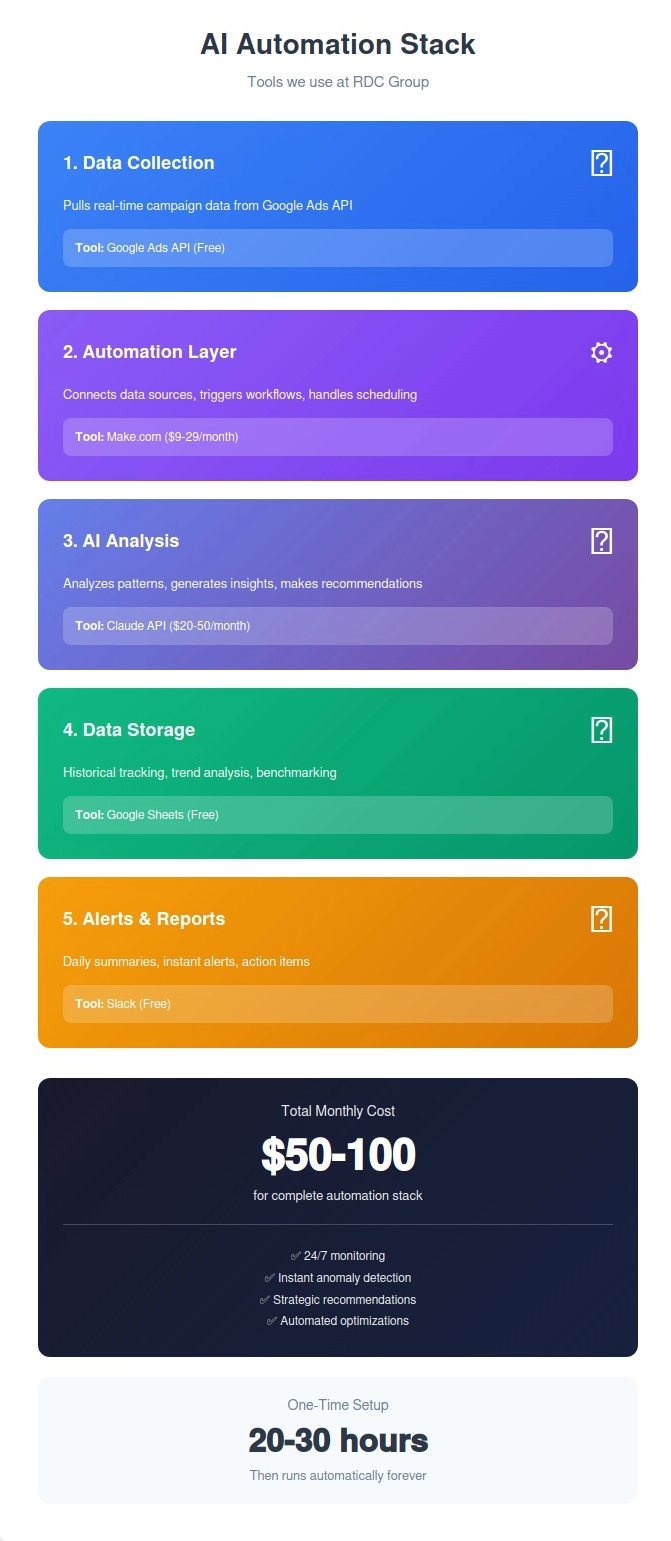
You don't need to be a developer to implement AI automation for Performance Max. Here's the exact stack we use at RDC Group:
1. Google Ads API
Purpose: Real-time campaign data access
Setup time: 2-3 hours (requires developer token approval)
Cost: Free
Documentation: developers.google.com/google-ads
2. Make.com (formerly Integromat)
Purpose: Automation workflows connecting Google Ads to AI analysis
Setup time: 4-6 hours for basic workflows
Cost: $9-29/month depending on operations
Why we use it: Native Google Ads integration makes it easy to pull data, trigger actions, and connect to other tools
3. Claude (Anthropic)
Purpose: Performance analysis and strategic recommendations
Setup time: 1 hour
Cost: $20/month (Pro plan) for personal use, API pricing for automation
Why we use it: Excellent at analyzing complex data patterns and providing strategic recommendations in plain English
4. Google Sheets
Purpose: Data storage and historical tracking
Setup time: 1 hour
Cost: Free
Why we use it: Easy to query, visualize trends, share with clients
5. Slack
Purpose: Alerts and daily reports
Setup time: 30 minutes
Cost: Free for basic use
Why we use it: Instant notifications when something needs attention
6. n8n (Self-hosted alternative to Make.com)
Purpose: More complex automation workflows
Cost: Free if self-hosted
Use case: Advanced users who want full control
7. Google Data Studio / Looker Studio
Purpose: Visual dashboards
Cost: Free
Use case: Client reporting
Here's exactly how the daily monitoring workflow works:
Every morning at 8 AM:
Total daily time investment: 5-10 minutes
vs manual analysis: 45-60 minutes
If you manage Performance Max campaigns and want to implement AI automation, here's the step-by-step process:
1. Audit your current Performance Max setup
2. Define what you want AI to monitor
Priority monitoring areas:
3. Get Google Ads API access
4. Choose your automation platform
5. Create daily performance report workflow
Make.com scenario:
Time to build: 2-3 hours
Template available: We provide Make.com templates to clients
6. Create budget pacing workflow
Make.com scenario:
Time to build: 3-4 hours
7. Create anomaly detection workflow
Make.com scenario:
Time to build: 2 hours
8. Implement asset performance tracking
9. Set up automated A/B testing
10. Build competitive intelligence monitoring
11. Review AI recommendations weekly
12. Expand automation gradually
Based on our experience implementing AI automation for dozens of campaigns, here are the mistakes to avoid:
The error: Setting up automated bid adjustments and budget changes on day 1.
Why it's bad: You don't yet know if the automation logic is sound. One bad formula can waste thousands in a day.
The fix: Start with monitoring and alerts only. Let the AI watch and report for 2-4 weeks. Once you trust the insights, gradually add automated actions.
Recommended progression:
The error: Giving AI full control without limits.
Why it's bad: Even good automation can make mistakes or act on incomplete data.
The fix: Set strict boundaries on what AI can change automatically.
Example guardrails:
The error: Assuming Google Ads data is always accurate and complete.
Why it's bad: Google's reporting has delays, conversions can be misattributed, and Performance Max data is inherently limited.
The fix:
Example: One of our clients showed 127 conversions in Google Ads but only 89 actual sales in their Shopify store. The discrepancy: Google was counting "Add to Cart" as a conversion, not just purchases.
The error: Having AI optimize aggressively for lowest CPA or highest ROAS day-to-day.
Why it's bad: Performance Max needs stability to learn. Constant changes disrupt the algorithm.
The fix:
Example: If CPA spikes 20% one day, don't panic and slash bids. Wait 48 hours to see if it's an anomaly or a trend.
The error: Focusing on metrics like CTR, impressions, clicks that don't directly impact business results.
Why it's bad: You can have amazing CTR and terrible ROI if you're attracting the wrong traffic.
The fix: Focus on business metrics first:
Secondary metrics like CTR and CPA only matter in context of these primary goals.
Not every business should run Performance Max with AI automation. Here's when it makes sense:
You should absolutely implement this if:
✅ You're spending $3,000+/month on Google Ads
(ROI on automation becomes clear at this spend level)
✅ You run multiple Performance Max campaigns
(More campaigns = more complexity = higher automation value)
✅ You track conversions and revenue accurately
(AI needs good data to make good decisions)
✅ You're frustrated with Performance Max complexity
(This directly solves your problem)
✅ You want to scale spend but afraid of losing efficiency
(AI enables confident scaling)
This makes sense if:
⚠️ You're spending $1,500-3,000/month
(Still valuable but ROI is lower—consider starting with free tools)
⚠️ You manage campaigns for 3+ clients
(Automation scales across accounts)
⚠️ You're comfortable with basic automation tools
(Learning curve exists—need willingness to learn)
Don't bother with this if:
❌ You spend <$1,500/month
(Automation overhead not worth it—manage manually)
❌ You run only Search campaigns
(Search doesn't need this level of automation—it's already transparent)
❌ Your conversion tracking is broken
(Fix tracking first, then automate)
❌ You change campaign strategy every week
(Automation needs stability to work)
❌ You want "set and forget"
(This still requires weekly review—it's just faster)
Based on Google's recent updates and our testing, here's what's coming for Performance Max and AI automation:
The speculation: Google may provide more search term data for Performance Max after advertiser pressure.
What we're seeing: Google is testing "search themes" reports that give slightly more visibility.
What this means for AI: If Google opens search term data, AI can optimize more precisely by identifying exact keywords that convert.
Our recommendation: Don't wait for Google. Build automation now, improve it when better data arrives.
The trend: Performance Max campaigns with video assets consistently outperform those without.
The data: Our campaigns with video see 40-60% higher impression share.
What AI can do: Test multiple video lengths, formats, and messages simultaneously.
Action item: Create 3-5 short videos (15-30 seconds) showing product usage, testimonials, or brand story.
The shift: With cookie deprecation, first-party data (your customer lists) becomes crucial.
What works: Uploading customer lists as audience signals in Performance Max significantly improves targeting.
What AI can do: Analyze which customer segments perform best, automatically refresh audience lists.
Action item: Export your customer email list, upload to Google Ads as Customer Match audience.
The innovation: AI that manages multiple Performance Max campaigns as a portfolio, not individual campaigns.
The benefit: Allocate budget dynamically across campaigns based on performance.
Example: If Campaign A (holiday products) is crushing 18X ROAS and Campaign B (everyday products) is at 6X, AI shifts budget toward Campaign A automatically.
What we're building: Portfolio-level optimization coming to RDC Group clients in Q2 2026.
The advancement: AI that forecasts "if you increase budget by $X, expect Y additional conversions with Z% confidence."
Why this matters: Takes the guesswork out of scaling decisions.
Current limitation: Requires 90+ days of stable data to make accurate predictions.
Our progress: Testing this now with clients who have 12+ months of Performance Max history.
If you run a Connecticut business and want to implement AI automation for your Google Ads Performance Max campaigns, here's your roadmap:
Time investment: 20-30 hours upfront + 2 hours/month maintenance
Cost: $50-100/month in tools
Difficulty: Moderate (requires comfort with APIs and automation platforms)
Steps:
Resources we provide:
Time investment: 5-10 hours over 4 weeks
Cost: Implementation fee + tools
Difficulty: Easy (we handle technical setup, you learn the system)
What we do:
What you do:

Time investment: 30 minutes/week reviewing reports
Cost: Monthly management fee
Difficulty: Hands-off (we manage everything)
What we handle:
What you receive:
Let's break down the real economics of implementing AI automation for Performance Max:
Without automation:
With automation:
Net benefit:
ROI: 1,050% in year 1
Without automation:
With automation:
Net benefit:
ROI: 2,716% in year 1
Without automation:
With automation:
Net benefit:
ROI: 1,501% in year 1
These are conservative estimates. Danforth Pewter achieved 82% ROAS improvement. Many of our clients see 60-100% improvements within 90 days.
Answer: Works for both, but tracking setup differs.
Ecommerce: Track revenue directly, ROAS is clear
B2B: Track lead quality (SQL vs MQL), cost per qualified lead, deal value
We manage Performance Max for:
All benefit from AI automation. The metrics we optimize for just differ.
Answer: Yes, and it makes your agency better.
Two approaches:
Option A: We work alongside your agency
Option B: We train your agency's team
Many agencies actually WANT this because it makes their results better and reduces their manual work.
Answer: Automation adapts faster than humans.
When Google updates Performance Max (which they do quarterly):
Example: When Google added search themes in August 2025, we updated our Make.com workflows in 45 minutes. Manual managers spent 2-3 hours figuring out what changed and how to use it.
Automation makes you MORE resilient to platform changes, not less.
Answer: No. We use official Google Ads APIs.
Everything we do:
What IS against ToS:
We don't do any of that. We work within Google's system, just more efficiently.
Answer: 30-60 days for meaningful improvements.
Week 1-2: AI starts learning your campaigns
Week 3-4: First optimizations implemented
Week 5-6: Clear performance trends emerge
Week 7-8: Significant ROAS/CPA improvements
Month 3+: Compounding benefits as AI learns more
Danforth Pewter timeline:
At RDC Group, we specialize in AI automation for Connecticut businesses—specifically for Google Ads Performance Max campaigns.
We're offering FREE Performance Max audits for Connecticut businesses through February 2026:
What you get:
What we'll tell you honestly:
📧 Email: renzo@rdcgroup.co
🌐 Website: rdcgroup.co
📅 Book Free Audit: https://calendly.com/renzo-consulting/rdcg-client
📞 Call: +1 (860) 968-0135
Performance Max is Google's most powerful campaign type—and also their most frustrating.
The black box problem is real. Manual management hits a ceiling. Scaling is risky.
AI automation solves this by:
Danforth Pewter went from 6.8X to 12.4X ROAS. That's not luck. That's systematic optimization that humans don't have time to do manually.
The opportunity: Most Connecticut businesses still manage Performance Max manually. That means:
The question isn't "should I automate Performance Max?"
The question is "how soon can I start?"
Related Reading:
Want weekly insights on AI automation and Google Ads optimization? Subscribe to our Connecticut business tech newsletter.
Last updated: January 5, 2026