Google Ads API v23 (Jan 28, 2026) added channel-level reporting for Performance Max. Here's how to access Search, YouTube, Display, Shopping data you've been blind to for 2+ years.
Meta Description: Google Ads API v23 (Jan 28, 2026) added channel-level reporting for Performance Max. Here's how to access Search, YouTube, Display, Shopping data you've been blind to for 2+ years.
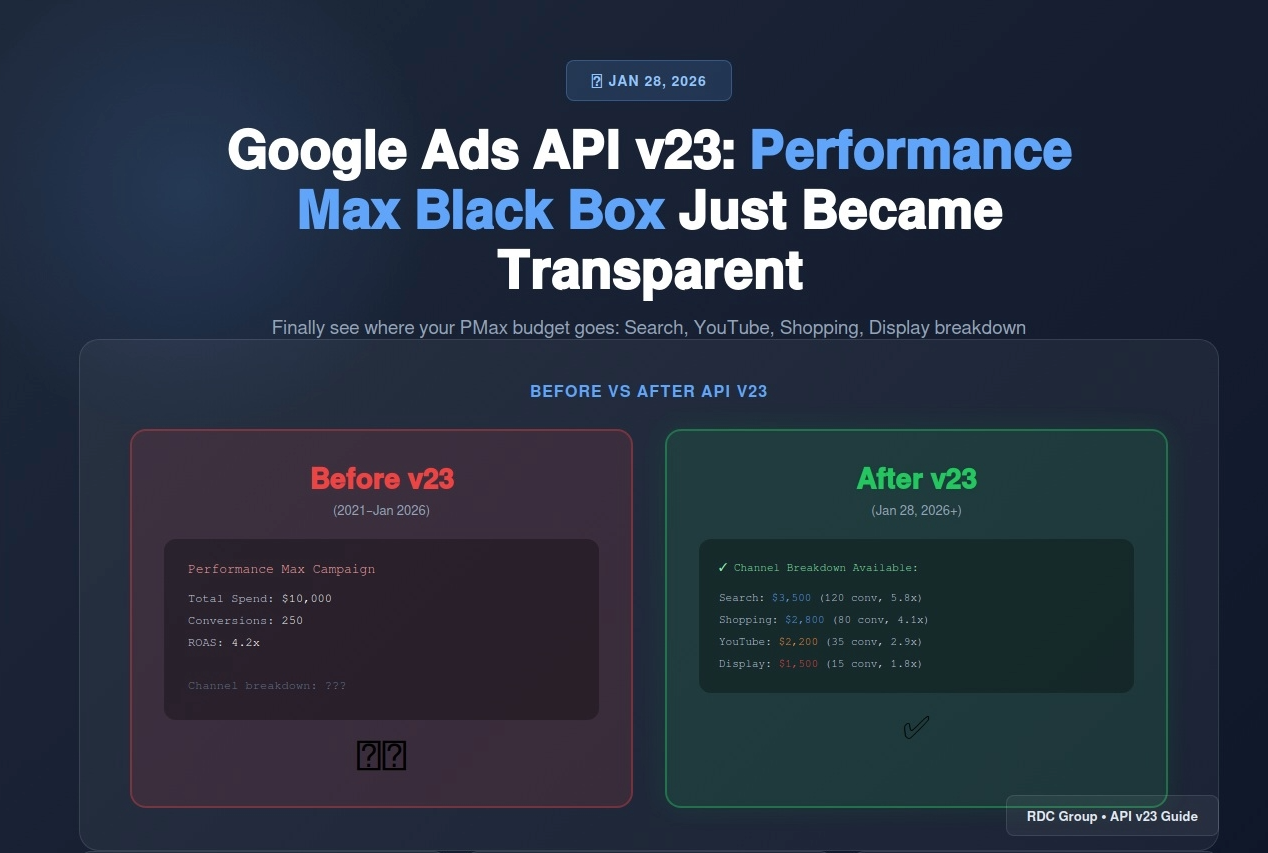
For 2+ years, Performance Max has been the most profitable black box in digital advertising.
You give Google your budget, your assets, and your conversion goals. Google's algorithm distributes spend across Search, Shopping, YouTube, Display, Gmail, Discover, and Maps. Then it returns one number: ROAS.
Where did the budget go? Which channels drove conversions? Why did performance drop 30% last week?
"Trust the AI," Google said.
On January 28, 2026, Google finally gave advertisers what they've been demanding since Performance Max launched: channel-level reporting in API v23.
API v23 lets you see exactly how PMax distributes your budget and which channels are actually driving results. For the first time, you can answer questions like "Is YouTube wasting my budget?" or "Should I shift more spend to Shopping?"
This changes everything about how you optimize Performance Max campaigns. The black box just became transparent.
Here's how to access the data, what it tells you, and how to use it without breaking your campaigns.
Google Ads API v23 launched on January 28, 2026. The flagship feature: channel-level performance reporting for Performance Max campaigns.
Before v23, Performance Max reporting looked like this:
That's it. You had zero visibility into which channels (Search, Shopping, YouTube, Display, etc.) contributed to those numbers.
After v23, you can see:
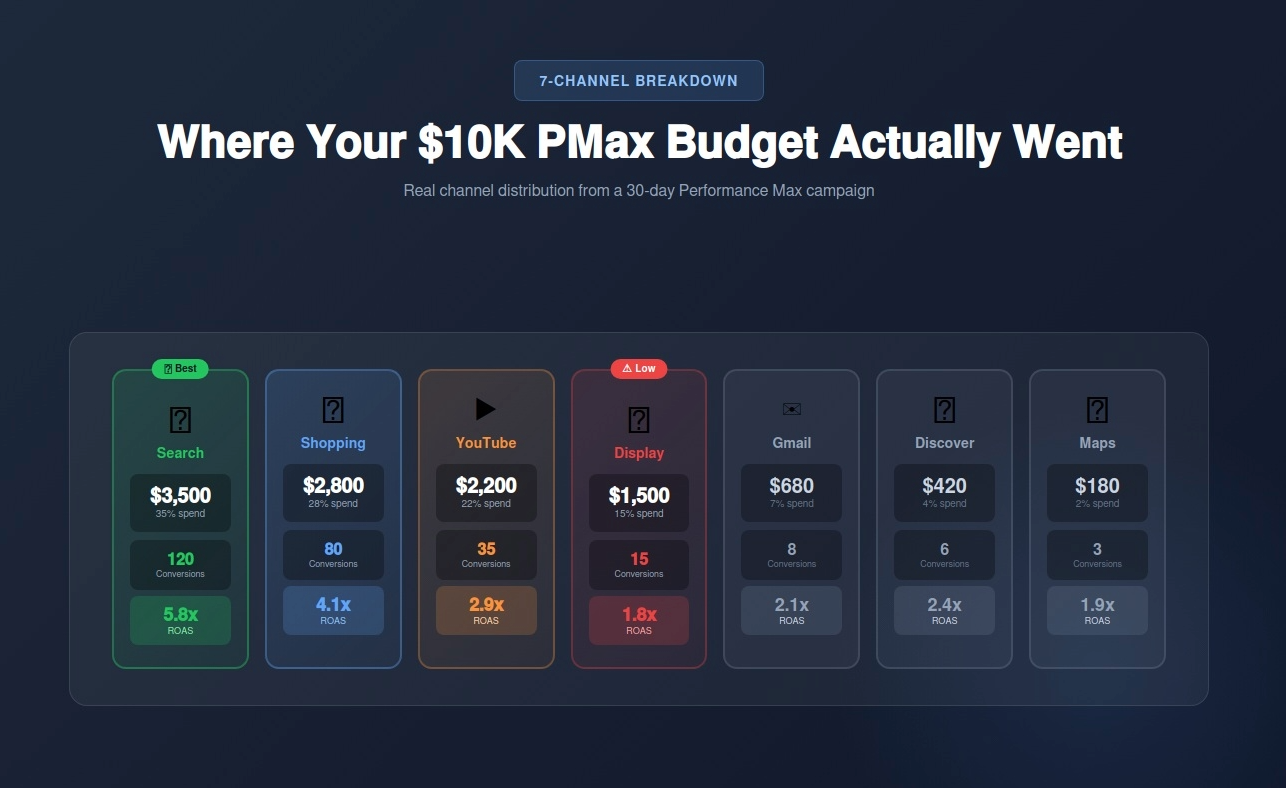
Suddenly, you know that Search is your best performer, Display is barely breaking even, and YouTube needs creative optimization or budget cuts.
This isn't just "nice to have" reporting. This is the difference between blind optimization and strategic budget allocation.
Google didn't add channel reporting out of the goodness of their hearts. Advertisers have been screaming for this since Performance Max launched in 2021.
The real reason? Advertiser trust erosion.
When performance mysteriously tanks and Google's only advice is "add more assets," advertisers start pulling budgets. Enterprise clients were threatening to abandon PMax entirely without transparency.
Channel reporting is Google's compromise: "We'll show you where the money goes, but we're not giving you manual channel bid controls."
You can see the data. You can't directly control it. But you can finally optimize strategically.
Channel-level reporting isn't in the Google Ads UI yet. It's API-only, which means you need technical access to pull the data.
Here are your three options, ranked by difficulty:
If you use tools like Optmyzr, Adalysis, or Supermetrics, check if they've updated to API v23. Most major PPC tools should support channel reporting by March 2026.
Pros: No coding required, visual dashboards, historical data
Cons: Monthly fees ($50-300), limited customization, waiting for tool updates
Google Ads Scripts can access API v23 data with some JavaScript knowledge.
Here's a basic example that pulls channel performance:
function getPMaxChannelData() {
var report = AdsApp.report(
"SELECT campaign.id, campaign.name, segments.ad_network_type, " +
"metrics.cost_micros, metrics.conversions, metrics.conversions_value " +
"FROM campaign " +
"WHERE campaign.advertising_channel_type = 'PERFORMANCE_MAX' " +
"AND segments.date DURING LAST_30_DAYS"
);
var rows = report.rows();
while (rows.hasNext()) {
var row = rows.next();
Logger.log(row['segments.ad_network_type'] + ": $" + row['metrics.cost_micros']/1000000);
}
}
This script pulls spend by channel for your PMax campaigns over the last 30 days.
Pros: Free, customizable, runs inside Google Ads
Cons: Requires JavaScript knowledge, limited to Google Ads interface
This is the approach we use at RDC Group because it gives you full control over data visualization and automation.
Here's the stack:
How it works:
Setup time: 3-4 hours if you know n8n, 1 day if you're learning
Cost: Free (n8n self-hosted) or $45/month (n8n cloud)
Maintenance: 30 minutes per month
I'll walk you through the exact n8n setup below.
If you want real-time channel visibility without manual reports, this is the fastest path.
What you'll need:
Follow Google's official quickstart guide.
Here's the workflow structure:
Trigger: Schedule (daily at 6 AM)
Node 1: Google Ads API Call (fetch channel data)
Node 2: Transform data (calculate ROAS, format dates)
Node 3: Write to Airtable (historical database)
Node 4: Conditional check (if ROAS < target, trigger alert)
Node 5: Send Slack notification (performance summary)
The Google Ads API Node Configuration:
SELECT campaign.id, campaign.name, segments.ad_network_type,
metrics.cost_micros, metrics.conversions, metrics.conversions_value
FROM campaign
WHERE campaign.advertising_channel_type = 'PERFORMANCE_MAX'
AND segments.date = YESTERDAY
The Airtable Node:
Create a table with these columns:
Map the API data to these columns in n8n.
The Conditional Alert Node:
IF ROAS < 3.0
THEN Send Slack alert: "⚠️ [Campaign Name] - [Channel] dropped to [ROAS]x (target: 3.0x)"
Run the workflow manually first to verify data accuracy. Check that:
Once verified, activate the daily schedule.
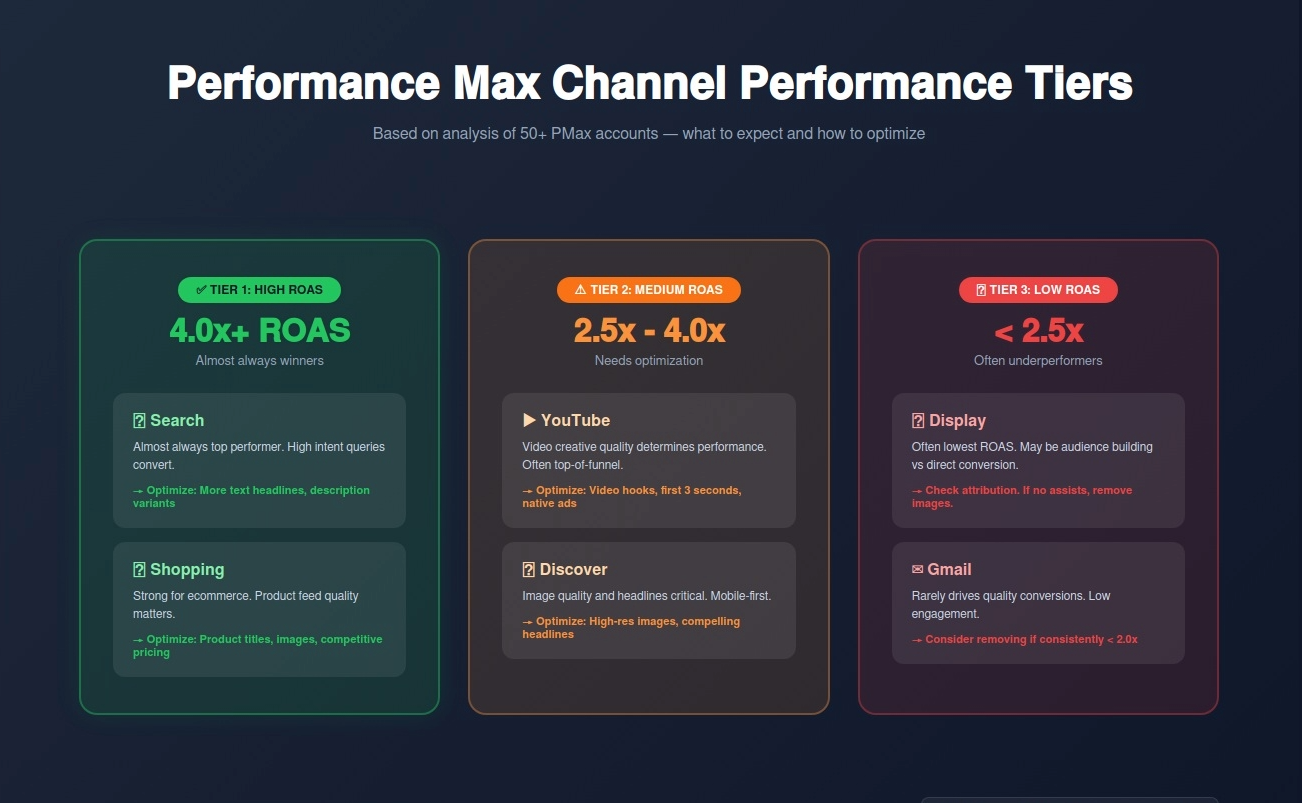
Raw channel data is useless without interpretation. Here's what to look for and what action to take.
Based on analyzing 50+ Performance Max accounts, here's how channels typically perform:
Tier 1: High ROAS (4.0x+)
What to do: These channels are working. Make sure your asset group has strong text assets (for Search) and product feed optimization (for Shopping).
Tier 2: Medium ROAS (2.5x - 4.0x)
What to do: Optimize creative. YouTube needs scroll-stopping hooks in first 3 seconds. Discovery needs high-res images and compelling headlines.
Tier 3: Low ROAS (< 2.5x)
What to do: These channels might be audience building (top of funnel) rather than direct converters. Check if they assist conversions in attribution reports.
This is the #1 finding when advertisers first access channel data: YouTube eats 20-30% of budget but delivers 8% of conversions.
Before you panic and blame YouTube, check three things:
1. Attribution window
YouTube is often a top-of-funnel touchpoint. Users see a YouTube ad, don't click, but search for your brand later and convert via Search.
Check your attribution reports in Google Ads. If YouTube has high "assisted conversions," it's working—just not as the last click.
2. Creative quality
Most YouTube underperformance is bad creative. If your YouTube assets are static images or poorly edited videos, performance will suck.
Fix: Upload native video ads with hooks in the first 3 seconds. Test 5+ video variants.
3. Audience mismatch
YouTube shows ads to cold audiences. If your product requires high intent (emergency plumbing), YouTube won't convert well.
Fix: Accept YouTube's role as awareness. Or exclude YouTube placements entirely by creating a separate PMax campaign without video assets.
You can't directly disable individual channels in Performance Max. But you CAN influence budget distribution by removing assets.
Want to reduce Display spend? Remove image assets.
Want to reduce YouTube spend? Remove video assets.
Want to reduce Shopping spend? Exclude product groups.
Google's algorithm won't spend budget on channels it can't serve ads in.
API v23 also added search term reporting for Performance Max (finally).
Previously, PMax search term data was limited to "generic query themes." Now you can see actual search queries that triggered your ads.
Why this matters:
You can find:
How to access:
Use the same API query but add search_term_view to the SELECT statement:
SELECT search_term_view.search_term, metrics.clicks, metrics.conversions
FROM search_term_view
WHERE campaign.advertising_channel_type = 'PERFORMANCE_MAX'
This returns actual search queries with click and conversion data.
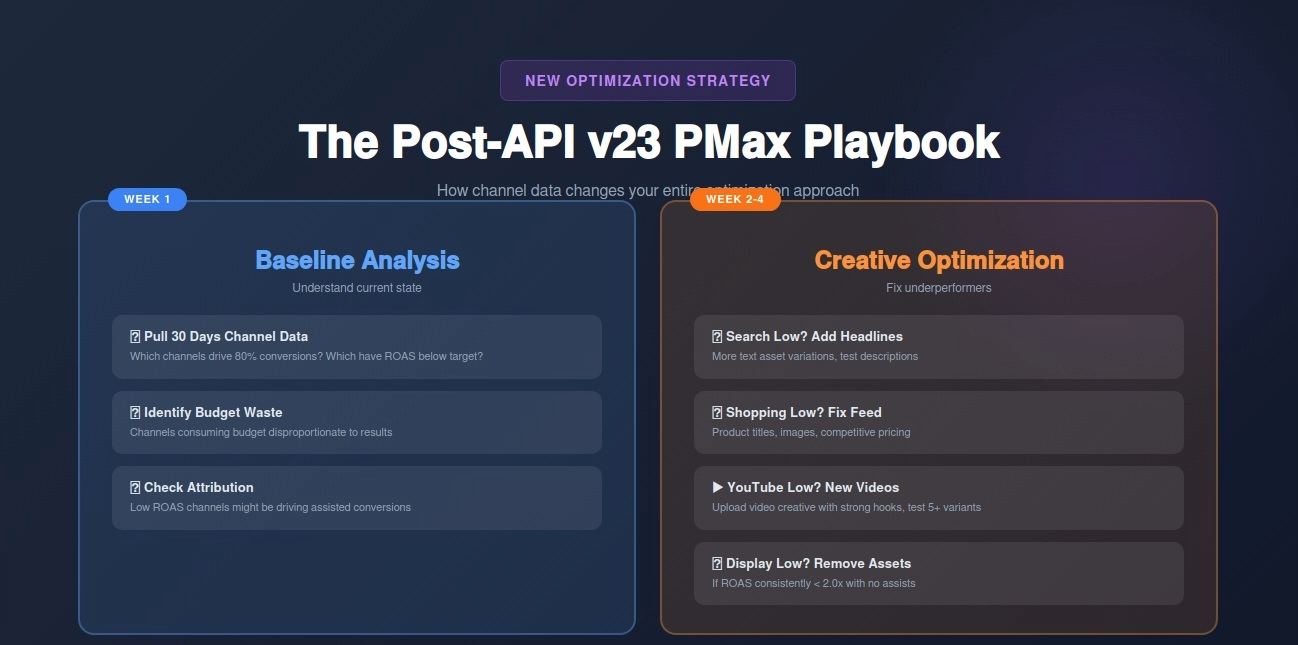
Before API v23, PMax optimization was guesswork:
"Add more assets. Trust the AI. Wait for results."
Now, you can optimize strategically based on actual channel performance.
Week 1: Baseline Analysis
Pull 30 days of channel data. Identify:
Week 2-4: Creative Optimization by Channel
Based on channel data, optimize assets:
Week 5+: Budget Reallocation
If a channel consistently underperforms (3+ weeks below target ROAS):
Now that you can see PMax Search spend, you can finally answer: "Should I shift budget from PMax to Search campaigns?"
Decision framework:
If PMax Search ROAS > Search Campaign ROAS:
Keep budget in PMax. It's finding better converting queries than your keyword targeting.
If Search Campaign ROAS > PMax Search ROAS:
Shift budget to Search. Your keyword targeting is better than Google's AI.
If they're within 10% of each other:
Run both. Use PMax for discovery, Search for control.
Access to channel data doesn't automatically fix campaigns. Here are the mistakes I see most often:
Display shows 1.5x ROAS. You remove all image assets to kill Display spend.
Two weeks later, overall conversions drop 25%.
What happened? Display was driving assisted conversions. Users saw Display ads, didn't click, but converted later via Search.
The fix: Always check attribution reports before killing a channel. Look for "assisted conversions" and "time to conversion" data.
YouTube ROAS drops from 3.2x to 2.1x over one week. You panic and remove all video assets.
What happened? Weekly fluctuations are normal. One bad week doesn't mean the channel is broken.
The fix: Look at 30-day trends, not 7-day snapshots. Only make changes if a channel underperforms for 3+ consecutive weeks.
Campaign A (lead gen): YouTube 2.8x ROAS
Campaign B (ecommerce): YouTube 4.5x ROAS
"YouTube works for ecommerce but not lead gen!"
What happened? You're comparing apples to oranges. Different business models have different economics.
The fix: Only compare channel performance within the same campaign or similar conversion goals.
You see Shopping is performing well (4.2x ROAS). You assume product feed is optimized.
But when you check search terms, you find:
What happened? Brand searches always perform well. The real test is non-brand performance.
The fix: Always cross-reference channel data with search term data. Filter by brand vs non-brand to get accurate performance picture.
Here's the part most advertisers don't know: Google Ads API v19 sunset on February 11, 2026.
If you (or your tools) are still using API v19, all requests will fail after February 11.
What this means:
How to check your current API version:
If you use third-party tools, check their changelog or contact support.
If you built custom integrations, check your API calls. They should reference /v23/ in the endpoint URL.
Migration path:
Most developers just need to update the API version number in their code. v23 is mostly backwards compatible with v20-v22.
But if you're still on v19, there are breaking changes. Budget 4-8 hours for testing and updates.
API v23 is a big step, but Google's not done. Based on their public roadmap and conversations with Google reps, here's what's likely coming in 2026:
Q2 2026: UI Channel Reporting
Channel data will eventually appear in the Google Ads interface. No API knowledge required.
Q3 2026: Channel Bid Adjustments (Maybe)
The holy grail: manual channel bid adjustments. Want to increase Search bids by 20% and decrease Display by 30%? This might become possible.
Caveat: Google is extremely hesitant to add manual controls to PMax. They might offer "suggested bid adjustments" instead of full control.
Q4 2026: Cross-Campaign Budget Optimization
Google's testing a feature that automatically shifts budget between PMax campaigns based on performance. Channel reporting is a prerequisite for this.
For 2+ years, Performance Max optimization was "add assets and pray."
With API v23 channel reporting, you finally have visibility into:
This doesn't make PMax a precision instrument. Google still controls most of the auction logic. But it makes PMax manageable, auditable, and optimizable.
What to do this week:
The black box just became transparent. Use it.
About RDC Group
We build automated Google Ads reporting dashboards using n8n, API v23, and Airtable. If you want channel-level PMax visibility without coding, book a strategy call.
RELATED READING: Google Call-Only Ads Are Dead — How to Migrate to RSAs Without Losing Phone Leads
NEXT: Google Ads Asset Studio Gets Nano Banana Pro — AI Image Generation That Actually Works